Ecommerce Accounting: A Complete Guide for Online Business Owners
Learn ecommerce accounting, bookkeeping, software, reconciliation, taxes, inventory, and monthly processes with this beginner-friendly guide.
Running an online store involves more than generating sales and fulfilling orders. Every transaction creates financial data that must be recorded, categorized, reconciled, and reviewed.
That is where ecommerce accounting becomes important.
Unlike traditional business accounting, online sellers must manage marketplace payouts, payment processing fees, refunds, shipping income, sales tax, inventory costs, discounts, chargebacks, and transactions from multiple platforms.
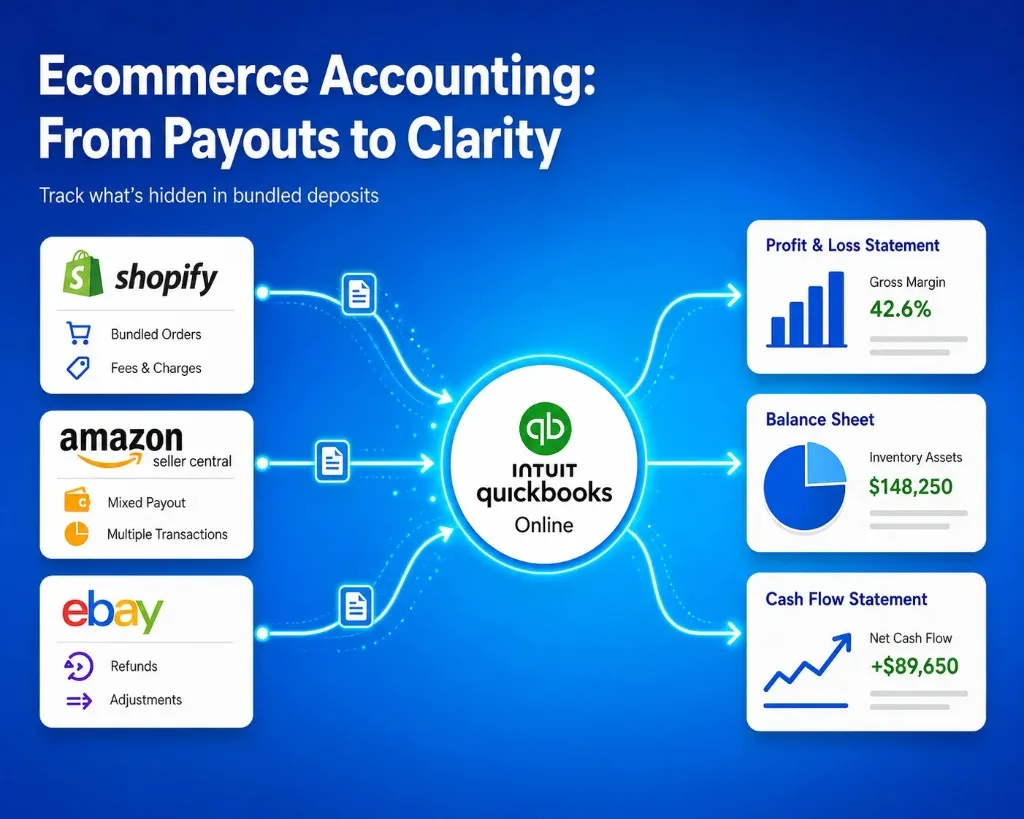
A single bank deposit may represent hundreds of customer orders after fees, refunds, taxes, and other deductions have already been applied. QuickBooks explains that ecommerce payouts can include sales, refunds, discounts, expenses, and adjustments within one deposit.
Without a reliable ecommerce bookkeeping process, it becomes difficult to understand:
- How much revenue the business actually generated
- Which fees were deducted
- Whether payouts match accounting records
- Which products are profitable
- How much inventory is available
- Whether sales tax has been recorded correctly
- How much cash the business can safely spend
This guide explains accounting for ecommerce businesses in simple terms, including the processes, software, services, reports, and automation options online sellers should consider.

What Is Ecommerce Accounting?
Ecommerce accounting is the process of recording, organizing, reconciling, and reporting the financial activity generated by an online business.
It covers money entering and leaving the business through ecommerce platforms, marketplaces, payment processors, banks, suppliers, advertising platforms, shipping providers, and other systems.
A complete ecommerce business accounting process may include:
- Recording online sales
- Tracking platform and payment fees
- Managing refunds and chargebacks
- Recording shipping income and expenses
- Tracking sales tax or VAT
- Managing inventory
- Calculating cost of goods sold
- Reconciling marketplace payouts
- Categorizing operating expenses
- Preparing financial statements
- Monitoring cash flow and profitability
Good accounting for an ecommerce business should help the owner understand not only how much money reached the bank but also how that amount was calculated.
Why Is Ecommerce Accounting Different?
Traditional businesses may receive payments directly from customers and record each transaction in a relatively straightforward way.
Ecommerce businesses often sell through platforms such as Shopify, Amazon, eBay, WooCommerce, Walmart, Etsy, or social commerce channels.
These platforms may:
- Combine multiple orders into one payout
- Deduct transaction and marketplace fees
- Subtract refunds and chargebacks
- Hold reserves
- Collect sales tax
- Process payments in different currencies
- Delay deposits for several days
- Apply adjustments after a sale
For example, your online store may generate $12,000 in sales during a payout period.
The amount deposited into your bank could be $10,450 after the platform deducts:
- $600 in refunds
- $400 in processing fees
- $300 in marketplace fees
- $250 in other adjustments
If you record the $10,450 deposit as total sales, your revenue and expenses will both be inaccurate.
Correct ecommerce accounting should record the $12,000 gross sales separately from refunds, fees, taxes, and adjustments.
Ecommerce Bookkeeping vs Ecommerce Accounting
Ecommerce bookkeeping and ecommerce accounting are closely connected, but they serve different purposes.
| Comparison Point | Ecommerce Bookkeeping | Ecommerce Accounting |
|---|---|---|
| Primary purpose | Records and organizes daily financial transactions | Analyzes financial data to support business decisions |
| Main focus | Transaction accuracy and record maintenance | Financial performance, planning, and compliance |
| Common tasks | Recording sales, fees, refunds, expenses, and payouts | Preparing reports, reviewing margins, forecasting cash flow, and tax planning |
| Frequency | Daily, weekly, or monthly | Monthly, quarterly, or annually |
| Typical outputs | Ledgers, reconciliations, categorized transactions, and supporting records | Profit and loss statements, balance sheets, forecasts, and financial insights |
| Ecommerce-specific work | Matching marketplace payouts, recording payment fees, and tracking refunds | Evaluating channel profitability, inventory performance, and financial risks |
| Usually handled by | Business owners, bookkeepers, or accounting software | Accountants, financial controllers, or finance professionals |
| Business value | Keeps ecommerce accounts complete and accurate | Helps owners understand profitability and make informed decisions |
What Is Ecommerce Bookkeeping?
Ecommerce bookkeeping focuses on the regular recording and organization of financial transactions.
Typical ecommerce bookkeeping tasks include:
- Recording sales and expenses
- Importing marketplace transactions
- Categorizing platform fees
- Matching payouts with bank deposits
- Recording refunds
- Reconciling bank and credit card accounts
- Maintaining supporting documents
- Updating accounts payable and receivable
Bookkeeping creates the financial records that accounting decisions rely on.
What Is Ecommerce Accounting?
Ecommerce accounting uses bookkeeping data to analyze the financial performance and position of the business.
Accounting tasks may include:
- Preparing financial statements
- Reviewing profit margins
- Managing tax reporting
- Selecting accounting methods
- Forecasting cash flow
- Evaluating inventory performance
- Planning budgets
- Supporting funding or investment decisions
In simple terms, bookkeeping records what happened, while accounting helps explain what those numbers mean.
What Should Ecommerce Businesses Track?
Accounting for online sellers requires tracking more than sales and bank deposits.
Gross Sales
Gross sales represent the total value of products sold before refunds, discounts, fees, and other deductions.
Tracking gross sales helps you measure total customer demand and compare performance across different sales channels.
Discounts
Discounts reduce the selling price of an order and should normally be recorded separately from gross revenue.
Separating discounts makes it easier to understand how promotions affect revenue and margins.
Refunds and Returns
Refunds reduce revenue, but returned products may also affect inventory.
Your accounting treatment may depend on whether the returned item:
- Goes back into inventory
- Is damaged
- Is written off
- Is replaced
- Is refunded without being returned
Marketplace and Payment Fees
Online sellers may pay:
- Marketplace commissions
- Payment processing fees
- Listing fees
- Fulfillment fees
- Storage fees
- Subscription fees
- Advertising fees
- Currency conversion charges
These expenses should be categorized correctly so you can calculate your actual cost of selling through each platform.
Shipping Income and Costs
Shipping amounts collected from customers should usually be tracked separately from the amount paid to carriers or fulfillment partners.
This helps determine whether shipping is generating income or creating an additional expense.
Sales Tax and VAT
Sales tax or VAT collected from customers is generally not business revenue. It may represent money collected on behalf of a tax authority.
Some marketplaces calculate, collect, and remit taxes for sellers, while others leave part of the responsibility with the business.
Because requirements vary by country, state, product, and sales channel, ecommerce businesses should consult an accountant or tax professional familiar with their locations and business model.
Inventory
Inventory purchased for resale is generally recorded as an asset until the product is sold. Once sold, its cost moves to cost of goods sold.
Accurate inventory accounting helps ecommerce businesses understand:
- The value of stock on hand
- Product availability
- Inventory shrinkage
- Gross profit
- Slow-moving products
- Reorder requirements
Cost of Goods Sold
Cost of goods sold, commonly called COGS, represents the direct cost of purchasing or producing the products sold during a particular period.
Depending on the business, COGS may include:
- Product purchase costs
- Raw materials
- Direct production labor
- Packaging
- Inbound freight
- Manufacturing expenses
Accurate COGS is necessary for calculating gross profit.
Gross profit = Revenue − Cost of goods sold
Without reliable COGS data, a product may appear profitable even when its true margin is very low.
Advertising Expenses
Advertising is often one of the largest expenses for ecommerce businesses.
Track spending from platforms such as:
- Google Ads
- Meta Ads
- TikTok Ads
- Amazon Advertising
- Influencer campaigns
- Affiliate programs
- Email marketing software
Separating advertising expenses by channel can help you compare marketing spend with revenue and profitability.
Ecommerce Accounting Process
A reliable ecommerce accounting process should follow a repeatable sequence.
Step 1: Separate Business and Personal Finances
Use a dedicated business bank account and business credit card.
Mixing personal and business expenses can make bookkeeping, tax preparation, and financial reporting unnecessarily difficult.
Step 2: Choose an Accounting Method
The two common accounting methods are cash and accrual accounting.
Cash Accounting
Under cash accounting, revenue is generally recorded when money is received, while expenses are recorded when they are paid.
This method may be easier for small businesses with simple financial activity.
Accrual Accounting
Under accrual accounting, revenue is recorded when it is earned, and expenses are recorded when they are incurred, regardless of when the money moves.
The IRS describes cash and accrual accounting using these timing differences.
Accrual accounting may provide a clearer view for ecommerce businesses that manage:
- Inventory
- Delayed marketplace payouts
- Supplier invoices
- Customer credit
- Returns
- Prepaid expenses
Accounting and tax requirements differ between jurisdictions, so businesses should confirm the correct method with a qualified accountant.
Step 3: Select Ecommerce Accounting Software
Accounting software provides the central system where financial data is recorded and reported.
Popular options include:
- QuickBooks Online
- Xero
- Zoho Books
- Sage
- NetSuite
- Microsoft Dynamics 365 Business Central
The best accounting software for an ecommerce business depends on transaction volume, company size, reporting needs, inventory complexity, locations, and existing systems.
Step 4: Create an Ecommerce Chart of Accounts
A chart of accounts organizes transactions into categories.
An ecommerce chart of accounts may include:
Revenue
- Product sales
- Shipping income
- Gift card income
- Marketplace sales
- Wholesale sales
Cost of goods sold
- Product costs
- Packaging
- Freight
- Manufacturing costs
Operating expenses
- Marketplace fees
- Payment fees
- Advertising
- Software
- Warehousing
- Shipping
- Professional services
Assets
- Bank accounts
- Inventory
- Accounts receivable
- Payment clearing accounts
Liabilities
- Sales tax payable
- Accounts payable
- Loans
- Gift card liabilities
- Marketplace reserves
The chart should be detailed enough to support decision-making without creating hundreds of unnecessary categories.
Step 5: Connect Sales Channels and Accounting Software
Your ecommerce platform, payment processors, marketplaces, and accounting system should exchange data accurately.
Manual CSV imports may work for a small store, but they become difficult to manage as order volume increases.
A connection between ecommerce and accounting systems can transfer information such as:
- Orders
- Customers
- Products
- Discounts
- Shipping
- Taxes
- Payments
- Refunds
- Fees
- Payouts
- Inventory
- COGS
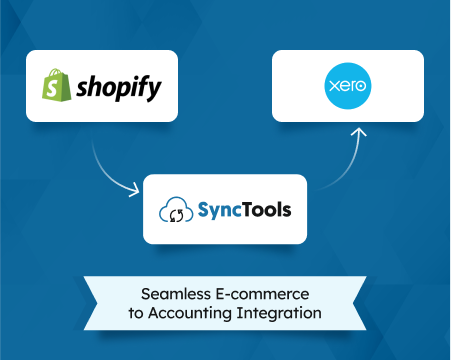
SyncTools connects ecommerce channels including Shopify, Amazon, and eBay with accounting platforms including QuickBooks, Xero, and Zoho Books.
Step 6: Record Sales Correctly
Decide whether your accounting system should receive:
- Every individual order
- Daily summarized sales
- Payout summaries
- Channel-level summaries
Individual transaction syncing provides detailed records but may create a high volume of accounting entries.
Summary accounting reduces the number of entries while keeping important categories such as sales, fees, refunds, shipping, and taxes visible.
The right approach depends on reporting requirements, order volume, accounting software capacity, and reconciliation preferences.
Step 7: Reconcile Ecommerce Payouts
Payout reconciliation confirms that the amount deposited into the bank matches the financial activity reported by the sales channel.
A typical reconciliation may compare:
- Gross sales
- Minus refunds
- Minus platform fees
- Minus payment fees
- Minus adjustments
- Plus or minus tax activity
- Equals bank payout
Unreconciled payouts can result in duplicated sales, missing fees, incorrect revenue, and unexplained differences in the bank account.
Step 8: Reconcile Bank and Credit Card Accounts
Bank reconciliation compares the transactions recorded in accounting software with actual bank activity.
This helps identify:
- Missing transactions
- Duplicate entries
- Incorrect amounts
- Unrecorded fees
- Failed payments
- Timing differences
- Unauthorized transactions
Bank and credit card accounts should be reconciled regularly rather than only at the end of the year.
Step 9: Update Inventory and COGS
Inventory quantities and values should reflect purchases, sales, returns, damage, and adjustments.
When products are sold, the related inventory cost should move into COGS.
This allows the profit and loss statement to show the gross margin generated during the period.
Step 10: Review Financial Reports
Once bookkeeping is complete, review the main financial statements.
Profit and Loss Statement
The profit and loss statement shows revenue, COGS, expenses, and profit over a selected period.
It helps answer:
- Is the business profitable?
- Are margins improving?
- Are fees increasing?
- Is advertising spending sustainable?
- Which expenses need attention?
Balance Sheet
The balance sheet shows what the company owns, what it owes, and the owner’s equity at a specific date.
Important ecommerce balance sheet accounts may include:
- Cash
- Inventory
- Accounts receivable
- Sales tax payable
- Accounts payable
- Loans
- Marketplace reserves
Cash Flow Statement
The cash flow statement explains how money moves through operating, investing, and financing activities.
A profitable ecommerce business can still experience cash shortages because money may be tied up in inventory, advertising, delayed payouts, or supplier payments.

Monthly Ecommerce Bookkeeping Checklist
Ecommerce business owners can use this checklist during each month-end close:
- Import sales channel activity
- Record gross sales separately from deductions
- Categorize platform and payment fees
- Record refunds, discounts, and chargebacks
- Verify sales tax or VAT accounts
- Match marketplace payouts with bank deposits
- Reconcile bank and credit card accounts
- Update inventory balances
- Record cost of goods sold
- Review accounts payable and receivable
- Check payment clearing accounts
- Review the profit and loss statement
- Review the balance sheet
- Analyze cash flow
- Investigate unusual balances
- Save supporting reports and documents
Completing these steps each month makes year-end accounting and tax preparation much easier.
Common Ecommerce Accounting Mistakes
Recording Net Payouts as Revenue
A marketplace deposit is not necessarily the same as sales revenue.
The payout may already include deductions for refunds, fees, taxes, or other adjustments.
Ignoring Marketplace Fees
Marketplace and payment processing fees can significantly reduce margins.
Recording only the bank deposit hides these expenses.
Failing to Reconcile Payouts
Without payout reconciliation, it is difficult to confirm whether every sale, refund, fee, and adjustment has been recorded.
Mixing Personal and Business Expenses
Using personal accounts for business spending makes transaction categorization and tax preparation more complicated.
Recording Sales Tax as Revenue
Tax collected from customers may represent a liability rather than revenue.
Incorrect classification can overstate sales and profit.
Tracking Revenue Without COGS
High revenue does not always mean high profitability.
Without accurate product costs, business owners cannot calculate reliable gross margins.
Waiting Until Year-End
Trying to correct an entire year of ecommerce accounts at once can lead to missing records, unexplained payouts, and expensive cleanup work.
Relying Only on Spreadsheets
Spreadsheets can be useful during the early stages of a business, but manual copying, formulas, downloads, and file versions become harder to manage as transaction volume grows.
Ecommerce Accounting Software vs Accounting Services
Ecommerce businesses can manage accounting through software, professional services, or a combination of both.
Ecommerce Accounting Software
Ecommerce accounting software helps businesses:
- Record transactions
- Categorize income and expenses
- Reconcile bank accounts
- Track inventory
- Generate reports
- Manage invoices
- Maintain financial records
Accounting software works best when it receives complete and well-organized data from ecommerce channels.
Ecommerce Accounting Integration Software
Integration software connects ecommerce platforms with accounting systems.
It can reduce manual work by transferring sales, fees, refunds, taxes, payments, and payout data into the accounting platform.
This is particularly valuable for businesses with high transaction volumes or multiple sales channels.
Ecommerce Accounting Services
Ecommerce accounting services may include:
- Monthly bookkeeping
- Payout reconciliation
- Tax preparation
- Inventory accounting
- Management reporting
- Cash flow forecasting
- Financial planning
- Cleanup of historical accounts
Hiring an accountant for an ecommerce business may be useful when the company has complex tax obligations, international operations, high inventory volume, multiple entities, or investor reporting requirements.
When Should You Hire an Ecommerce Accountant?
Consider hiring an ecommerce accountant or bookkeeper when:
- Monthly bookkeeping takes too much time
- Payouts no longer match bank deposits
- The business sells through multiple channels
- Inventory values are unreliable
- Sales tax responsibilities are unclear
- Financial reports cannot be trusted
- The company is expanding internationally
- You are preparing for funding or a sale
- Historical records need correction
- Revenue is growing faster than financial processes
Look for ecommerce accountants who understand marketplaces, payment gateways, inventory, COGS, clearing accounts, and payout reconciliation.
A general accountant may understand financial reporting but may not be familiar with the way ecommerce platforms combine transactions into deposits.
How Automation Supports Ecommerce Accounting
Automation can reduce repetitive accounting work, but it should be configured around the business’s actual accounting requirements.
Useful accounting automation may include:
- Importing ecommerce transactions
- Mapping sales to revenue accounts
- Categorizing fees
- Recording refunds
- Applying tax rules
- Posting payment entries
- Matching payouts
- Syncing inventory data
- Recording COGS
- Flagging synchronization errors
- Producing summarized entries
Automation does not remove the need for financial review.
Business owners, bookkeepers, or accountants should still review mappings, exceptions, account balances, tax treatment, and financial reports.
The goal is to reduce manual data handling while maintaining accounting control.
How SyncTools Helps With Ecommerce Accounting
SyncTools connects ecommerce sales channels with accounting software so transaction data does not have to be repeatedly downloaded and entered manually.
Depending on the selected integration and configuration, businesses can sync information such as:
- Sales
- Customers
- Products
- Discounts
- Shipping
- Taxes
- Fees
- Payments
- Refunds
- Payouts
- Inventory
- Cost of goods sold
Businesses can configure individual or summarized transaction syncing based on their reporting and accounting preferences.
This helps ecommerce business owners maintain more complete records, simplify payout reconciliation, and access financial information without relying on repeated spreadsheet exports.
Final Thoughts
Ecommerce accounting gives business owners a clearer understanding of revenue, fees, inventory, costs, cash flow, and profitability.
The most important step is to create a repeatable accounting process that records the full financial activity behind every payout.
Start by separating business finances, selecting the right accounting software, creating a suitable chart of accounts, reconciling payouts, tracking inventory and COGS, and reviewing reports every month.
As order volume grows, connecting sales channels with accounting software can reduce repetitive bookkeeping and help maintain dependable ecommerce accounts.
Frequently Asked Questions
What is ecommerce accounting?
- Ecommerce accounting is the process of recording, reconciling, analyzing, and reporting the financial transactions generated by an online business. It includes sales, fees, refunds, taxes, inventory, payouts, expenses, and cost of goods sold.
How is ecommerce bookkeeping different from regular bookkeeping?
- Ecommerce bookkeeping must account for bundled marketplace payouts, platform fees, payment processing charges, refunds, sales tax, inventory, multiple currencies, and transactions from several selling channels.
What is the best accounting software for an ecommerce business?
- The best ecommerce accounting software depends on the size and complexity of the business. Common options include QuickBooks Online, Xero, Zoho Books, Sage, NetSuite, and Microsoft Dynamics 365 Business Central.
Do I need an accountant for my ecommerce business?
- A small ecommerce business may manage basic bookkeeping internally, but an ecommerce accountant becomes valuable when the business has complex inventory, multiple marketplaces, tax obligations, international sales, or high transaction volume.
How often should ecommerce bookkeeping be completed?
- Sales and payout data should ideally be updated regularly, while bank accounts, credit cards, inventory, clearing accounts, and financial reports should be fully reviewed at least monthly.
How do I reconcile ecommerce payouts?
- Start with gross sales and account for refunds, fees, taxes, reserves, and adjustments. The resulting amount should match the payout deposited into the business bank account.
Can ecommerce accounting be automated?
- Many repetitive tasks can be automated, including transaction imports, account mapping, refund recording, fee categorization, payout posting, and synchronization between ecommerce platforms and accounting software.
What reports should ecommerce businesses review?
- Ecommerce businesses should regularly review the profit and loss statement, balance sheet, cash flow statement, inventory report, sales by channel, gross margin, accounts payable, and payout reconciliation reports.
Ready to automate your accounting?
Connect Shopify, WooCommerce, or Linnworks to QuickBooks, Xero & more. Setup in minutes.