Amazon Accounting and Bookkeeping: From Sales to Reconciliation
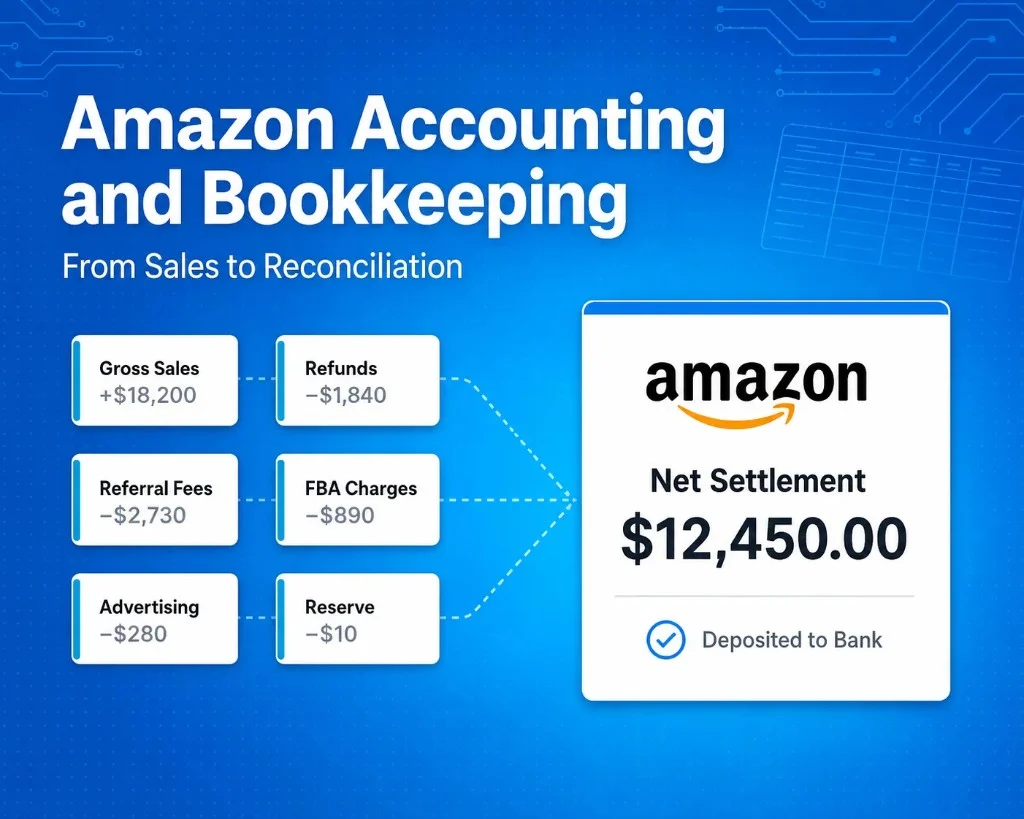
Accounting for Amazon sellers isn't just about the amount Amazon deposits into your bank account.
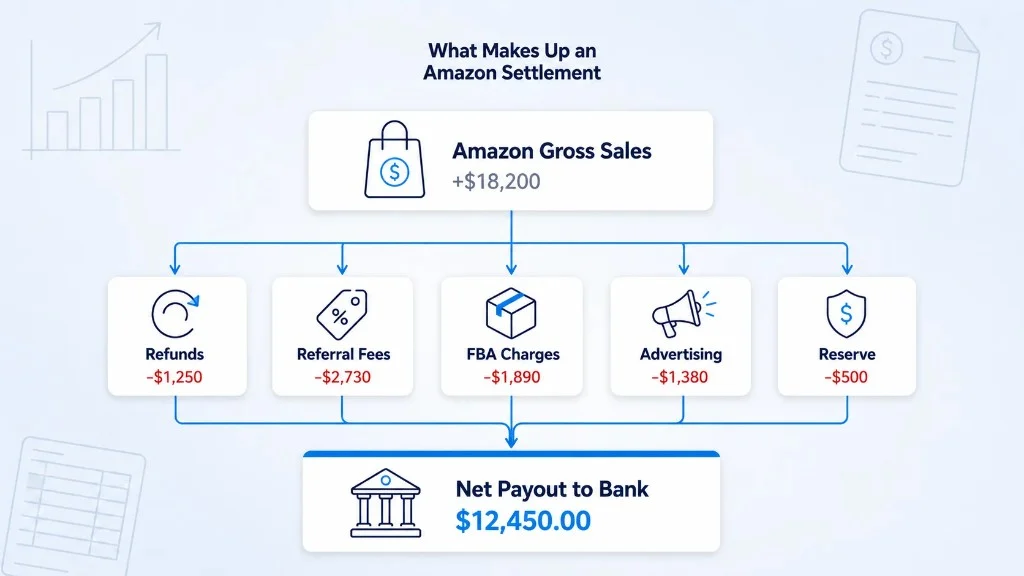
A payment can consist of sales, refunds, marketplace fees, FBA charges, advertising costs, reserves, reimbursements, and other adjustments; by the time the money reaches your bank account, a number of financial transactions may have already been combined into a single settlement.
That is why accurate accounting by Amazon sellers should begin with the activities that lead to a payout, not just the payout itself.
For sellers, this creates an important question:
Can your books give a reason for the difference between the quantity you sold and the amount that Amazon paid you?
An accounting procedure that is reliable should make the answer clear.
What does Amazon seller accounting entail?
The accounting carried out by Amazon sellers involves recording, classifying, settling, and preparing reports on the financial activity produced by an Amazon business.
It can include:
- Sales
- Refunds
- Amazon fees
- FBA costs
- Ad costs
- Reimbursements
- Inventory
- Product costs
- Reserves
- Settlements
- Bank deposits
- Taxes
Amazon bookkeeping involves recording and sorting these transactions.
Accounting goes beyond the records and helps sellers understand revenue, expenses, profit, cash flow, inventory, and overall business performance.
Keeping the books accurate is important for both.
Why Does Amazon's Accounting Appear More Complicated Than It Actually Is?
It becomes difficult for Amazon to prepare its accounts since the bank deposit does not include all the transactions that took place before the payout.
Amazon subtracts several charges before transferring the remaining balance.
If the seller records revenue only at the time of the final bank deposit, important information will vanish from the books.
This can affect visibility into:
- Gross sales
- Refund activity
- Amazon fees
- FBA costs
- Advertising expenses
- Reserves
- Reimbursements
- Actual marketplace profitability
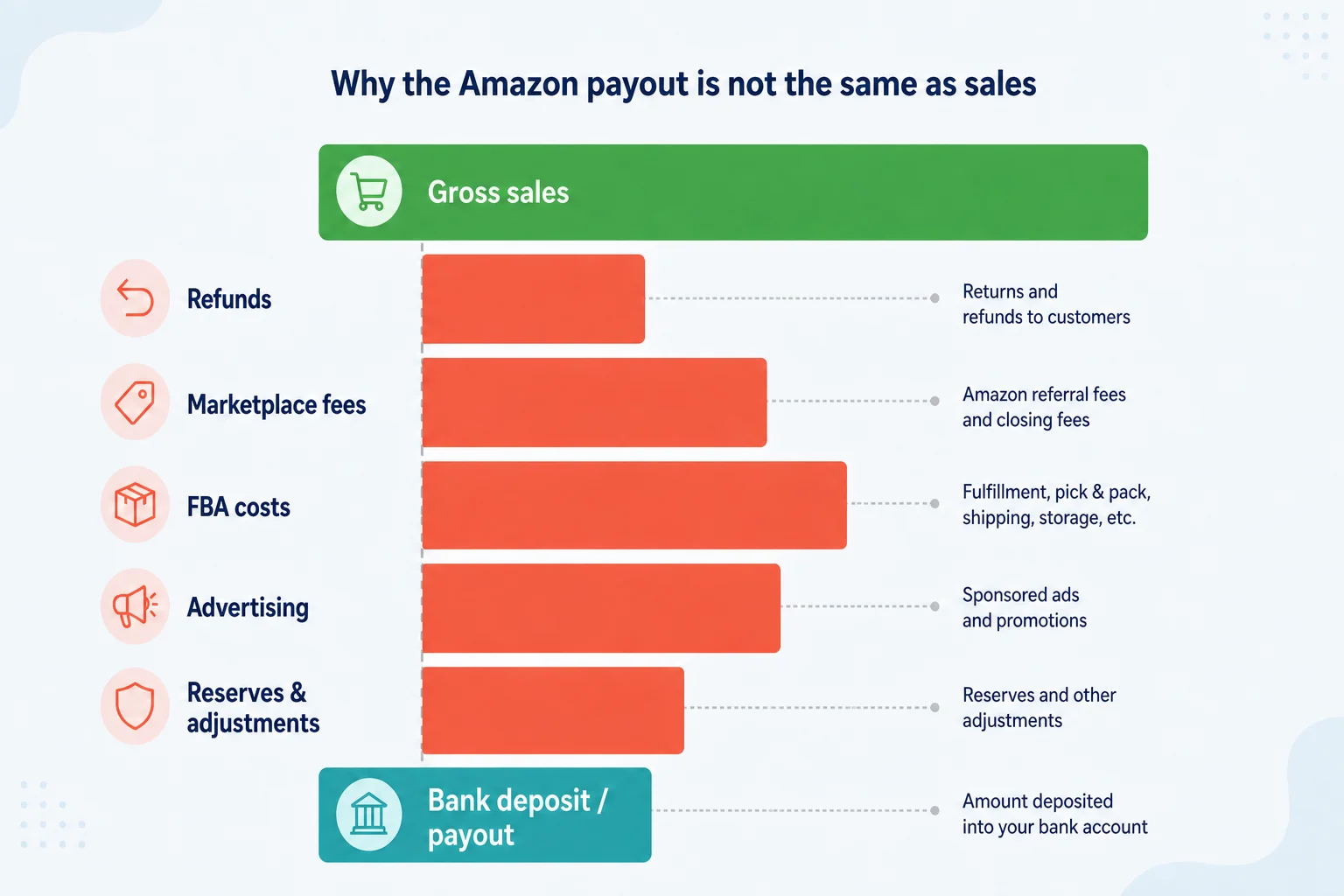
Good accounting for Amazon sellers should therefore explain both sides:
What the business sold
and
Why the final payout was different
The more transactions there are, the more important this distinction becomes.
Sales and Payouts May Fall in Different Months
Amazon does not deposit sales figures into the bank in the same month the customer places the order.
A sale can be made at the end of one month even if the corresponding Amazon settlement and bank deposit take place in the next month.
This creates a timing difference between:
- Sales activity
- Settlement activity
- Cash received
It is therefore possible to get an incomplete picture of monthly performance if you look only at the bank feed.
The Amazon accounting system should maintain the distinction between the timing of sales and the timing of cash receipt.
It helps sellers understand why a strong sales month might not result in the same amount of cash appearing in their bank account.
This also helps accountants to produce cleaner period-end reports.
Amazon FBA Accounting Requires Better Cost Visibility
Accounting for Amazon FBA includes more than just tracking sales.
FBA sellers can incur fulfillment charges, storage costs, marketplace fees, advertising expenses, returns, and other costs in addition to the cost of the product, which is why COGS should usually stay separate from Amazon-related selling expenses. COGS shows you the cost of the products that the business sold. Cost to the business.
The amount you pay to Amazon through FBA shows the cost of selling and fulfilling products via the marketplace.
These are different money questions.
If everything is grouped, sellers may struggle to understand:
- Which products make the most profit
- If fulfillment costs are going up
- If ads are cutting into profit
- If product costs have increased
- Why profit is dropping even when sales rise
Proper bookkeeping for Amazon FBA should make it easier to review these cost layers.
A Practical Amazon Bookkeeping Workflow
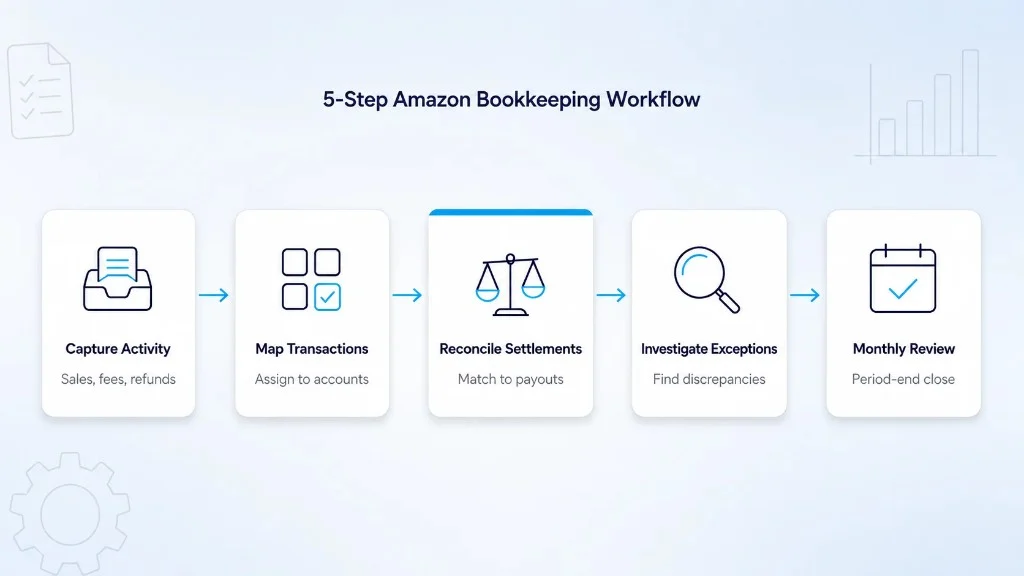
Amazon sellers don't need an excessively complicated accounting procedure.
We want every payment to be traceable.
Step 1: Capture Amazon Financial Activity
Begin with the underlying activity in the marketplace.
This can include:
- Sales
- Refunds
- Fees
- FBA charges
- Advertising
- Reimbursements
- Reserves
- Adjustments
We want to understand what took place before we categorize the activity.
Step 2: Map Transactions Correctly
Put each transaction into the right accounting category.
For example:
| Transaction | Accounting category |
|---|---|
| Product sales | Sales revenue |
| Refunds | Sales returns |
| Referral fees | Marketplace fees |
| FBA costs | Fulfillment expenses |
| Advertising | Advertising expenses |
| Inventory | Inventory asset |
| COGS | Cost of goods sold |
| Settlements | Clearing account |
The specific structure will vary according to the business and accounting requirements.
The primary aim is to maintain consistency.
Step 3: Reconcile Amazon Settlements
When you have included the Amazon transactions in your records, make sure that the expected payout agrees with the amount that you actually received in your bank.
A clear account helps you track any amount Amazon still owes.
When the figures differ, check for fees, refunds, held payments, other adjustments, and timing differences.
Step 4: Investigate Exceptions
The common reasons for reconciliation differences include:
- Late refunds
- Held payments
- Missing entries
- Wrong entries
- Duplicate entries
- Currency conversion
- Incomplete imports
- Other Amazon adjustments
The aim is to get the books to balance, not force it.
The goal is to find out why they don't.
Step 5: Review the Month
Each month, when you're finishing up the accounts, check your sales, refunds, the costs associated with Amazon and FBA, the cost of goods sold, any settlements, the deposits made to your bank, the amounts that are still pending, and any unusual entries.
It helps you better understand what happened during the month and more easily identify anything that needs attention.
Why Manual Amazon Bookkeeping Becomes Difficult
Over time, the business may add:
- More monthly orders
- More SKUs
- FBA
- Additional marketplaces
- More refunds
- Multiple currencies
- Higher advertising spend
The larger the business becomes, the more data there is to check and manage.
With a manual process, teams may need to repeat the same tasks again and again:
- Download reports
- Clean spreadsheets
- Separate transaction types
- Identify refunds
- Map fees
- Post entries
- Match settlements
- Compare bank deposits
- Investigate differences
The primary issue isn't simply time.
Errors can also arise from manual processes.
For example:
- Refunds could be paid into the wrong account.
- Reimbursements can be treated as sales.
- The same transaction can be entered once.
- Some fees may be missed.
- A settlement may be recorded more than once.
- COGS may use old product costs.
This is where structured Amazon bookkeeping software can become useful.
Common Amazon Bookkeeping Mistakes
Several accounting issues appear repeatedly as Amazon businesses grow.
Recording the Payout as Revenue
The bank deposit may already include several deductions.
Recording it directly as sales can hide the real marketplace activity.
Grouping Every Amazon Fee Together
Putting all fees into one broad account may simplify bookkeeping, but it reduces financial visibility.
Sellers may not know whether costs are rising because of fulfillment, storage, advertising, or another expense.
Ignoring Refund Timing
Refunds may affect a later settlement than the original sale.
Without proper tracking, this can distort monthly results.
Not Tracking COGS Properly
Sales may look good, but it may still be unclear how much profit each product actually makes.
Ignoring Reconciliation Differences
Small unexplained balances can build up over time.
They should be reviewed rather than automatically adjusted away.
What Should Amazon Accounting Software Do?
The best accounting software for Amazon sellers is not necessarily the platform with the longest feature list.
The better question is:
Can the software help explain Amazon activity from the original transaction through to the reconciled bank deposit?
Useful Amazon accounting software should help with:
- Capturing gross marketplace activity
- Separate transaction types
- Keep entries consistent
- Manage more transactions
- Track refunds and changes
- Match payouts
- Spot errors
- Connect with your accounting software.
Automation should reduce repetitive bookkeeping work.
It should not remove the need for accounting judgment.
Do Amazon Sellers Need Accounting Services?
Not every seller needs professional Amazon accounting services from the beginning.
Professional support becomes more useful as the business grows in complexity.
Sellers may need help with:
- Tax treatment
- Inventory accounting
- Financial reporting
- Multi-currency transactions
- Multiple entities
- International sales
- Period-end adjustments
- Accounting methods
- Audit preparation
Software and accountants serve different purposes.
Software helps organize and move data.
Accountants apply judgment to how that information should be treated and reported.
For many growing Amazon businesses, both become part of the accounting stack.
How SyncTools Supports Amazon Accounting
SyncTools connects ecommerce marketplace activity with accounting platforms and supports structured transaction mapping and reconciliation.
For an Amazon seller, the problem is not simply moving data from Amazon to an accounting system.
The real challenge is making sure that:
- Sales are recorded correctly.
- Refunds are separated
- Fees are categorized
- COGS is visible
- Settlements can be explained.
- Bank deposits can be reconciled.
That becomes increasingly important for businesses managing higher transaction volumes, multiple SKUs, refunds, several marketplaces, and more complex settlement activity.
The objective is simple:
Your books should make it easy to see how each Amazon payout was calculated and where the money came from.
Your Amazon Payout Should Be Easy to Explain
A matching bank deposit does not automatically mean the accounting behind it is correct.
Your accounting records should make it possible to understand:
- What Amazon sold
- What customers refunded
- What Amazon deducted
- What the products cost
- What Amazon still owed the business
- What ultimately reached the bank
If your team needs multiple reports, spreadsheets, and manual calculations to explain a single Amazon payout, the problem isn't the complexity of Amazon alone. It's the reconciliation workflow behind it.
Simplify Amazon Accounting With SyncTools
SyncTools connects Amazon transaction activity with your accounting system and helps structure the financial data behind each settlement.
Instead of treating an Amazon payout as a single bank deposit, SyncTools helps organize the underlying activity including sales, refunds, fees, FBA charges, adjustments, and settlements so your accounting records provide a clearer view of what happened.
That means less manual work spent downloading reports, categorizing transactions, rebuilding settlements, and matching deposits, and more time spent reviewing the financial performance of your Amazon business.
Your Amazon sales, fees, refunds, and settlements shouldn't require a spreadsheet detective.
Frequently Asked Questions
What is Amazon seller accounting?
Amazon seller accounting helps track the money coming in and going out of your Amazon business, including sales, refunds, fees, FBA charges, inventory costs, settlements, reserves, and bank deposits.
Is an Amazon payout the same as Amazon sales?
No. The payout may already include deductions for refunds, fees, FBA expenses, reserves, and other marketplace activity.
What is Amazon FBA bookkeeping?
Amazon FBA bookkeeping tracks marketplace sales alongside fulfillment expenses, inventory, COGS, refunds, fees, settlements, and other FBA-related financial activity.
Why doesn't my Amazon payout match my sales?
Amazon may deduct fees, refunds, reserves, adjustments, and other costs before sending the remaining balance to your bank.
Do I need Amazon bookkeeping software?
Not always. However, software becomes more useful as orders, SKUs, refunds, marketplaces, currencies, and reconciliation requirements increase.
Do I still need an accountant if I use Amazon bookkeeping software?
Yes, when professional judgment is needed for tax, financial reporting, inventory treatment, accounting policies, or more complex transactions.
Ready to automate your accounting?
Connect Shopify, WooCommerce, or Linnworks to QuickBooks, Xero & more. Setup in minutes.