Marketplace Fees Compared: Amazon vs eBay vs Facebook Marketplace
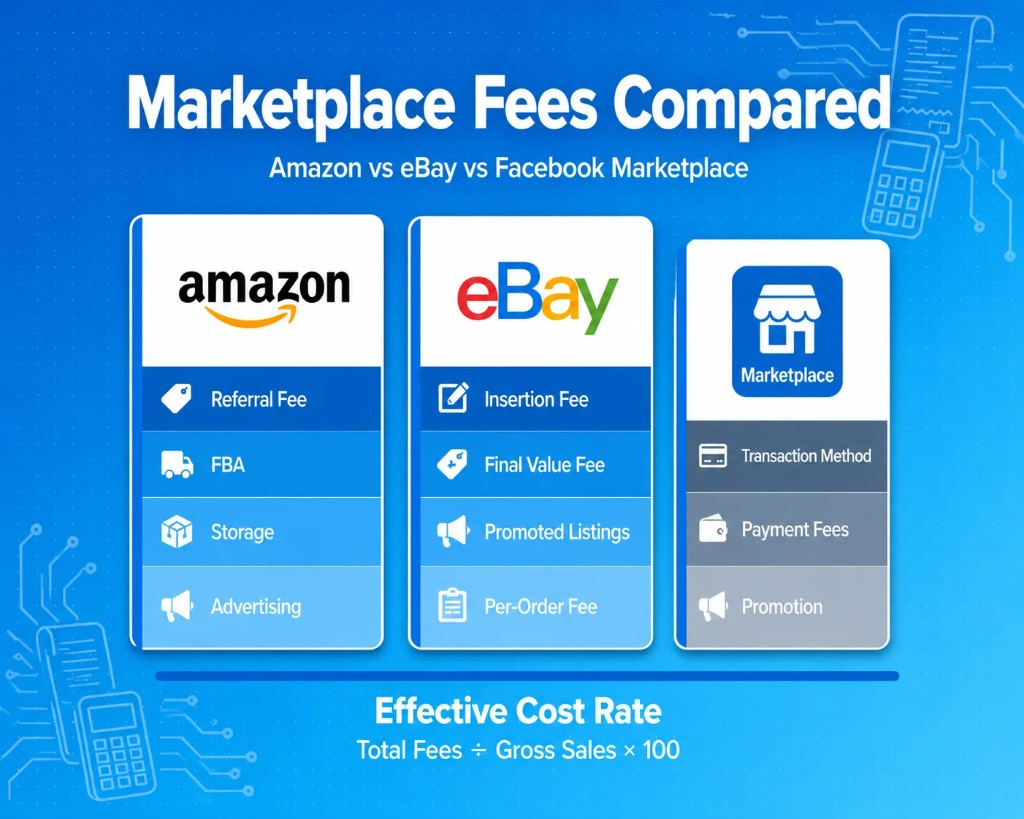
The cheapest marketplace isn't determined by its headline selling fee. Amazon, eBay, and Facebook Marketplace use different fee structures, and your actual cost can change based on product category, selling volume, fulfillment, advertising, shipping, refunds, and location.
For a meaningful comparison, calculate:
Total marketplace cost ÷ gross marketplace sales = effective marketplace cost rate
Then compare the resulting rate across channels using the same products, order volume, and period.
What Online Sellers Should Know About Marketplace Fees
Marketplace fees are the costs sellers pay to use an online selling platform. The amount can vary depending on the marketplace, products sold, seller plan, and services used.
Common costs may include:
- Listing fees
- Selling commissions
- Monthly subscriptions
- Payment charges
- Storage and fulfillment
- Advertising costs
- Refund adjustments
- Shipping charges
- Currency conversion costs
Looking at just one percentage may therefore not show the full cost of selling through a marketplace.
How to Evaluate Marketplace Fees Before Choosing a Platform
A simple way to compare platforms is to look at the total cost of each sale instead of focusing on one charge.
Before choosing where to sell, ask:
- Do I pay to list products?
- What does the platform take after a sale?
- Is there a monthly subscription?
- Are fulfillment or storage costs involved?
- How much am I spending on advertising?
- What happens when an order is refunded?
- How much will I receive after all deductions?
A basic calculation can look like this:
Total marketplace sales
– Marketplace charges
– Refunds
– Fulfillment and selling costs
= Amount remaining before other business expenses
For example, suppose an ecommerce business brings in $50,000 from marketplace sales in one month.
| Financial Activity | Example Amount |
|---|---|
| Gross marketplace sales | $50,000 |
| Marketplace and transaction costs | -$7,500 |
| Refunds | -$2,000 |
| Other selling and fulfilment costs | -$5,000 |
| Amount remaining | $35,500 |
The figures above are hypothetical and are included only to explain the calculation.
The $14,500 difference comes from fees, refunds, and other selling costs. Separating these amounts makes it easier to see where marketplace revenue is going.
Amazon Marketplace Fees: Seller Plans, Referral Fees & FBA Costs
Understanding Amazon marketplace fees starts with choosing a selling plan.
Amazon seller plan fees
| Plan | Cost |
|---|---|
| Individual | $0.99 per item sold |
| Professional | $39.99 per month |
Note: These are not the total cost of selling on Amazon. Sellers may also incur category-specific referral fees and optional costs such as FBA fulfillment, inventory storage, and advertising.
What Makes Up the Total Amazon Marketplace Cost?
The Amazon marketplace cost includes more than the seller plan.
Depending on how your store operates, costs may include:
- Referral fees
- FBA fulfillment
- Inventory storage
- Advertising
- Optional services
- Returns and adjustments
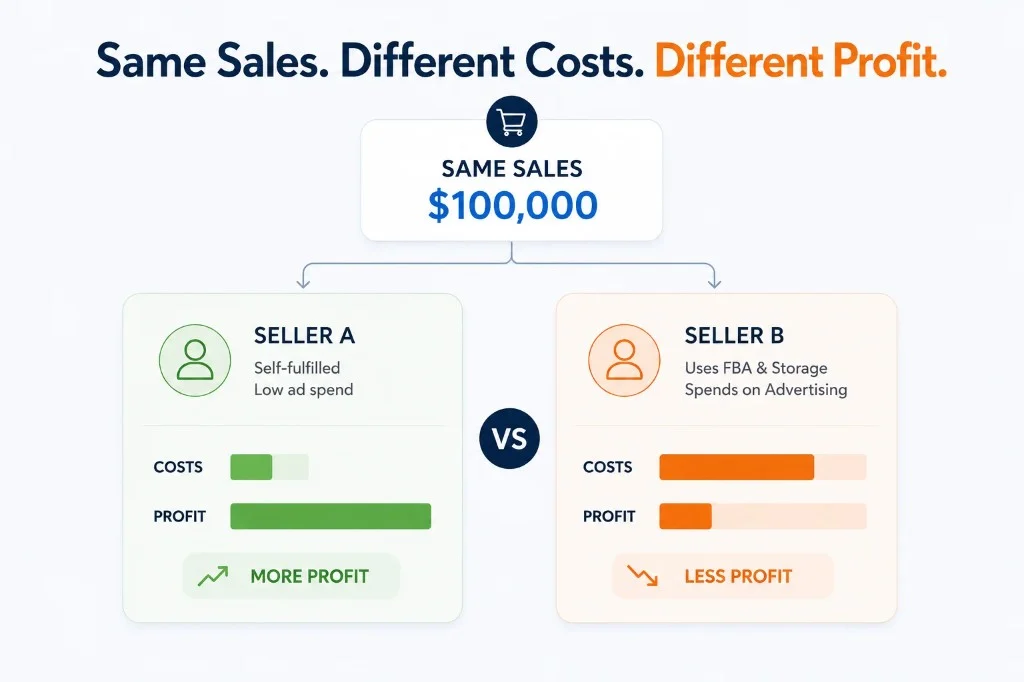
Consider two sellers earning the same amount.
Seller A handles shipping independently and spends very little on advertising.
Seller B uses Amazon FBA, stores inventory within Amazon's fulfillment network, and pays for ads.
Their sales may be the same, but their remaining profit can look very different after marketplace costs are included.
Instead of asking only how much Amazon charges, sellers should ask:
How much does Amazon cost my business for every dollar of sales it generates?
Understanding the Amazon Marketplace Fee by Product Category
There is no single Amazon marketplace fee for every product.
Referral fees vary by category. Products such as electronics, clothing, home goods, pet supplies, watches, and other items may have different rates.
This matters because sellers also work with different profit margins. Before listing a product, review the applicable category fee and include it in your pricing and profitability calculations.
Listing Fee and Other eBay Seller Charges
eBay follows a different fee structure from Amazon.
One charge sellers may encounter is the listing fee, also known as an insertion fee. On eBay.com, sellers generally receive up to 250 zero-insertion-fee listings per month. After this allowance, a $0.35 insertion fee applies to most categories, although exclusions may apply.
When an item sells, eBay also charges a final value fee. For many categories, eBay currently charges 13.6% of the total amount of the sale up to $7,500, while some categories have different rates.
A per-order fee of $0.30 for orders of $10 or less or $0.40 for orders above $10 also applies under the standard fee structure.
Importantly, eBay calculates the final value fee on the total amount of the sale, which may include:
- Item price
- Shipping charged to the buyer
- Sales tax
- Other applicable amounts under eBay's fee rules
Sellers may also pay additional costs for:
- Listing upgrades
- Promoted Listings
- eBay Store subscriptions
- International selling
- Additional seller tools
This means the actual cost of selling on eBay depends not only on the product category, but also on the total transaction value and any optional services used by the seller.
eBay Fees vs Amazon Fees: Which Platform Costs More?
When comparing eBay fees vs Amazon fees, no answer works for every seller.
The final cost can depend on:
- Product type
- Selling price
- Order volume
- Fulfilment method
- Advertising costs
- Listing volume
- Extra services
Sellers should therefore compare fees using their own sales data rather than relying only on headline percentages.
Online Selling Fees Comparison: Amazon, eBay & Facebook Marketplace
The cheapest marketplace is not always the one with the lowest headline fee. Your actual selling cost depends on what you sell, how much you sell, how orders are fulfilled, whether you advertise, and how many additional charges are deducted before payout.
Here is the comparison that matters most to sellers:
| Fee / Cost | Amazon | eBay | Facebook Marketplace |
|---|---|---|---|
| Seller plan | Individual $0.99/item; Professional $39.99/month | No mandatory seller subscription for standard selling | Depends on selling method/region |
| Listing fee | No standard per-item listing fee under standard plans | Up to 250 zero-insertion listings/month; then fees may apply | Depends on listing/transaction type |
| Selling fee | Referral fee varies by category | Final value fee varies by category | Depends on transaction method/region |
| Fulfillment | Optional FBA | Generally seller-managed | Depends on transaction |
| Storage | FBA storage charges may apply | Generally seller-managed | Generally not applicable to local transactions |
| Advertising | Amazon Ads | Promoted Listings | Promotion availability varies |
| Payout | Marketplace payout after applicable deductions | Fees/selling costs deducted from proceeds | Depends on payment method |
| Best comparison metric | Total marketplace cost ÷ gross sales | Total marketplace cost ÷ gross sales | Total transaction cost ÷ gross sales |
Amazon's current U.S. standard selling plans are $0.99 per item for Individual and $39.99/month for Professional, with referral fees varying by category and additional costs possible for services such as FBA and Amazon Ads.
eBay currently gives sellers up to 250 zero-insertion-fee listings per month in many cases, with insertion fees after that allowance; its final value fee varies by category and includes a per-order charge.
What Does the Comparison Tell Sellers?
No marketplace is always the cheapest.
Amazon may add extra fulfillment and storage costs when you use FBA. eBay costs can change based on category, listing volume, and selling price. Facebook Marketplace works differently depending on how the transaction is completed.
The better question is not which platform has the lowest advertised fee, but which one leaves your business with the strongest result after all costs are included.
Does Facebook Marketplace Charge Fees? What Sellers Should Check
Facebook Marketplace doesn't have one universal seller-fee percentage comparable to Amazon's referral fees or eBay's final value fees.
The cost depends on how the transaction is completed, the seller's location, and which Marketplace commerce and payment features are available to the seller.
For example, a local transaction where the buyer and seller arrange payment and pickup directly is fundamentally different from a transaction where the platform facilitates shipping, payment, or other commerce services.
Before calculating Facebook Marketplace profitability, identify:
- Where the transaction is completed
- Who processes the payment
- Who collects shipping charges
- Whether Marketplace charges a selling or processing fee
- Whether paid promotion is being used
- What rules apply in the seller's country or region
For this reason, Facebook Marketplace should not be assigned a single “fee percentage” in a marketplace comparison table without specifying the transaction model and market.
How to Calculate Your Effective Marketplace Fee
Effective marketplace fee rate = Total marketplace fees ÷ Gross marketplace sales × 100
For example:
| Metric | Amount |
|---|---|
| Gross marketplace sales | $50,000 |
| Marketplace selling fees | $5,000 |
| Payment fees | $1,000 |
| Advertising | $1,000 |
| Fulfillment/storage | $2,000 |
| Total marketplace-related costs | $9,000 |
| Effective marketplace cost | 18% |
Why Marketplace Sales Don't Equal Your Bank Deposit
Suppose Amazon reports:
Gross sales: $20,000
During the settlement period:
- Refunds: –$1,500
- Referral fees: –$2,400
- FBA fees: –$1,800
- Advertising: –$700
- Other adjustments: –$100
The resulting payout is:
$13,500
Your bank statement therefore shows $13,500, but your accounting records still need to explain the underlying $20,000 of gross sales and the deductions that produced the payout.
This is why recording only the bank deposit as revenue can make marketplace accounting difficult to analyze.
How Marketplace Fees Should Flow Into Ecommerce Accounting
A marketplace transaction can generate several separate financial events:
Order → Gross sale → Discount → Tax → Marketplace fee → Fulfillment → Refund → Adjustment → Payout
Your accounting workflow should preserve these components rather than treating the final bank deposit as the entire transaction.
For each marketplace, consider tracking:
- Gross sales
- Discounts
- Refunds
- Marketplace fees
- Payment processing fees
- Fulfillment fees
- Storage fees
- Advertising costs
- Shipping
- Taxes
- Other adjustments
- Net payout
This gives finance teams enough detail to reconcile marketplace statements with accounting records and evaluate channel profitability.
Which Marketplace Has the Lowest Fees?
There is no universal winner.
Amazon, eBay, and Facebook Marketplace use different fee models, and the lowest advertised fee does not necessarily produce the lowest total cost.
A better comparison is:
Effective marketplace cost = all marketplace-related costs ÷ gross marketplace sales
For example, a seller using Amazon FBA may have higher total marketplace costs than a seller fulfilling orders independently on eBay, even if the headline selling fee appears similar.
Likewise, a local Facebook Marketplace transaction may have a very different cost structure from a transaction where the platform facilitates payment and shipping.
Compare the total cost of a completed sale, not one fee in isolation.
Last updated: August 2026
Fee information in this article applies to U.S. marketplace accounts unless otherwise stated. Marketplace pricing and seller terms can change, so verify current fees with the marketplace before making pricing or channel decisions.
Stop Letting Marketplace Payouts Hide Your Real Costs
Marketplace fees are only part of the equation.
To understand what a marketplace actually contributes to your business, you need to connect gross sales, refunds, fees, fulfillment costs, taxes, adjustments, and final payouts back to your accounting records.
Doing that manually across Amazon, eBay, Facebook Marketplace, Shopify, and other channels can turn every month-end close into a spreadsheet exercise.
SyncTools automates the flow of ecommerce sales and marketplace transaction data into your accounting workflow, helping you reconcile what was sold, what the marketplace deducted, and what ultimately reached your bank.
With SyncTools, you can bring together:
- Marketplace sales
- Fees and commissions
- Refunds and adjustments
- Taxes
- Payouts
- Channel-level transaction data
So instead of accounting for a single bank deposit, you can see the financial activity behind it.
Know what your marketplaces really cost.
Automate marketplace accounting and payout reconciliation with SyncTools.
Connect your ecommerce channels with QuickBooks, Xero, and other accounting systems.
Frequently Asked Questions
What are marketplace fees?
Marketplace fees are charges associated with selling through an online marketplace. They can include listing fees, selling commissions, payment charges, fulfillment, storage, advertising, refunds, and other transaction-related costs.
How do I calculate the true cost of selling on Amazon?
Add the Amazon selling plan, referral fees, fulfillment, storage, advertising, refunds, and other applicable costs, then divide the total by gross Amazon sales.
Effective Amazon cost = Total Amazon-related costs ÷ Gross Amazon sales × 100
Are eBay fees cheaper than Amazon fees?
Not necessarily. The effective cost depends on product category, selling price, order volume, fulfillment, advertising, seller plan, and other charges.
Does Facebook Marketplace charge sellers?
There is no single universal Facebook Marketplace seller fee. Costs can depend on the transaction method, location, payment method, shipping functionality, and other available Marketplace features.
Why is my marketplace payout lower than my sales?
Marketplace payouts can be lower than gross sales because the marketplace may deduct selling fees, refunds, fulfillment charges, advertising costs, taxes, and other adjustments before paying the seller.
Should marketplace fees be recorded as an expense?
Marketplace fees generally need to be accounted for separately from gross sales when the business's accounting treatment requires gross revenue and related expenses to be presented separately. The exact treatment depends on the business's accounting framework and circumstances.
How do I reconcile Amazon or eBay payouts?
Match the marketplace settlement or transaction report against the accounting records and bank deposit. The reconciliation should explain gross sales, refunds, fees, taxes, adjustments, and the resulting payout.
What is the best way to compare marketplace profitability?
Compare net contribution, not just the marketplace's advertised selling fee.
A useful framework is:
Gross sales − refunds − marketplace fees − fulfillment − advertising − other channel costs = marketplace contribution
Then compare the result across channels using the same time period and product set.
The goal isn't simply to know what Amazon, eBay, or Facebook Marketplace charges. It's to know how those charges affect your actual revenue, margins, and accounting records.
That's where automated marketplace reconciliation becomes valuable.
Ready to automate your accounting?
Connect Shopify, WooCommerce, or Linnworks to QuickBooks, Xero & more. Setup in minutes.