Fashion eCommerce Accounting Before Peak Season: Returns, COGS, SKUs & Payouts
Peak season can bring record-breaking orders for fashion eCommerce brands. Black Friday, Cyber Monday, holiday promotions, and end-of-season clearance events can increase sales across Shopify, marketplaces, and direct-to-consumer (DTC) stores.
But increased revenue also brings accounting challenges.
A single clothing style may have dozens of size and color combinations. Promotional discounts reduce selling prices, returns and exchanges affect inventory, and payment gateways deduct fees before releasing payouts.
If these transactions are not recorded correctly, fashion brands may struggle to determine how much profit their peak-season campaigns actually generated.
Preparing your fashion eCommerce accounting before peak season is essential for accurate inventory valuation, COGS calculations, refund processing, and payout reconciliation.
This guide provides a practical accounting readiness checklist for fashion retailers, apparel brands, and Shopify merchants preparing for high-volume sales periods.
Key Takeaways
- Review SKU and product mapping before launching seasonal collections or promotions.
- Verify inventory costs and COGS for individual product variants.
- Test accounting workflows for refunds, returns, and exchanges.
- Confirm how discounts, payment gateway fees, and payouts are recorded.
- Reconcile outstanding transactions before peak sales begin.
- Monitor accounting exceptions throughout the sales period.
- Use accounting automation to reduce repetitive transaction processing and improve financial visibility.
Why Fashion eCommerce Accounting Gets Complicated During Peak Season
Fashion businesses face several accounting challenges that become more visible during high-volume sales periods.
Unlike businesses selling a limited number of standardized products, fashion retailers often manage hundreds or thousands of product variants.
A single shirt available in five sizes and four colors represents 20 distinct SKUs. Each variant may have different inventory quantities, sales patterns, return rates, and sometimes production costs.
During peak season, several factors add complexity.
Higher Order and Transaction Volumes
Increased sales create additional transactions involving customer payments, discounts, shipping charges, taxes, refunds, and processing fees.
If accounting teams depend on spreadsheets or manual entry, transaction volumes can create reconciliation backlogs.
Multiple Sizes, Colors, and Product Variants
Fashion inventory requires accurate SKU identification.
Incorrect product mapping can affect inventory records and make it difficult to determine which variants generate the highest margins.
Seasonal Discounts and Markdown Campaigns
Fashion brands regularly use promotional discounts to increase sales or clear older inventory.
Although discounts may improve order volume, they can reduce gross margins.
Accounting systems must accurately distinguish gross selling prices, discounts, net revenue, and inventory costs.
Returns and Exchanges
Clothing returns often involve sizing issues, damaged items, product exchanges, or customer preferences.
These transactions can affect sales revenue, inventory valuation, COGS, taxes, and payout reconciliation.
Delayed Marketplace and Payment Gateway Payouts
A fashion brand may record hundreds of orders on one day while receiving the related funds several days later.
Marketplace commissions, refunds, and payment processing charges may also be deducted before funds reach the bank.
Without accurate reconciliation, bank deposits may not match reported sales.
Ready to Simplify Peak-Season Accounting?
SyncTools connects Shopify and marketplaces with QuickBooks Online and Xero, automating transaction sync, COGS recording, and payout reconciliation for fashion brands.
Pre-Peak Season Fashion eCommerce Accounting Checklist
Fashion businesses should prepare their accounting processes before launching major seasonal campaigns.
The following seven checks help identify potential issues before order volumes increase.
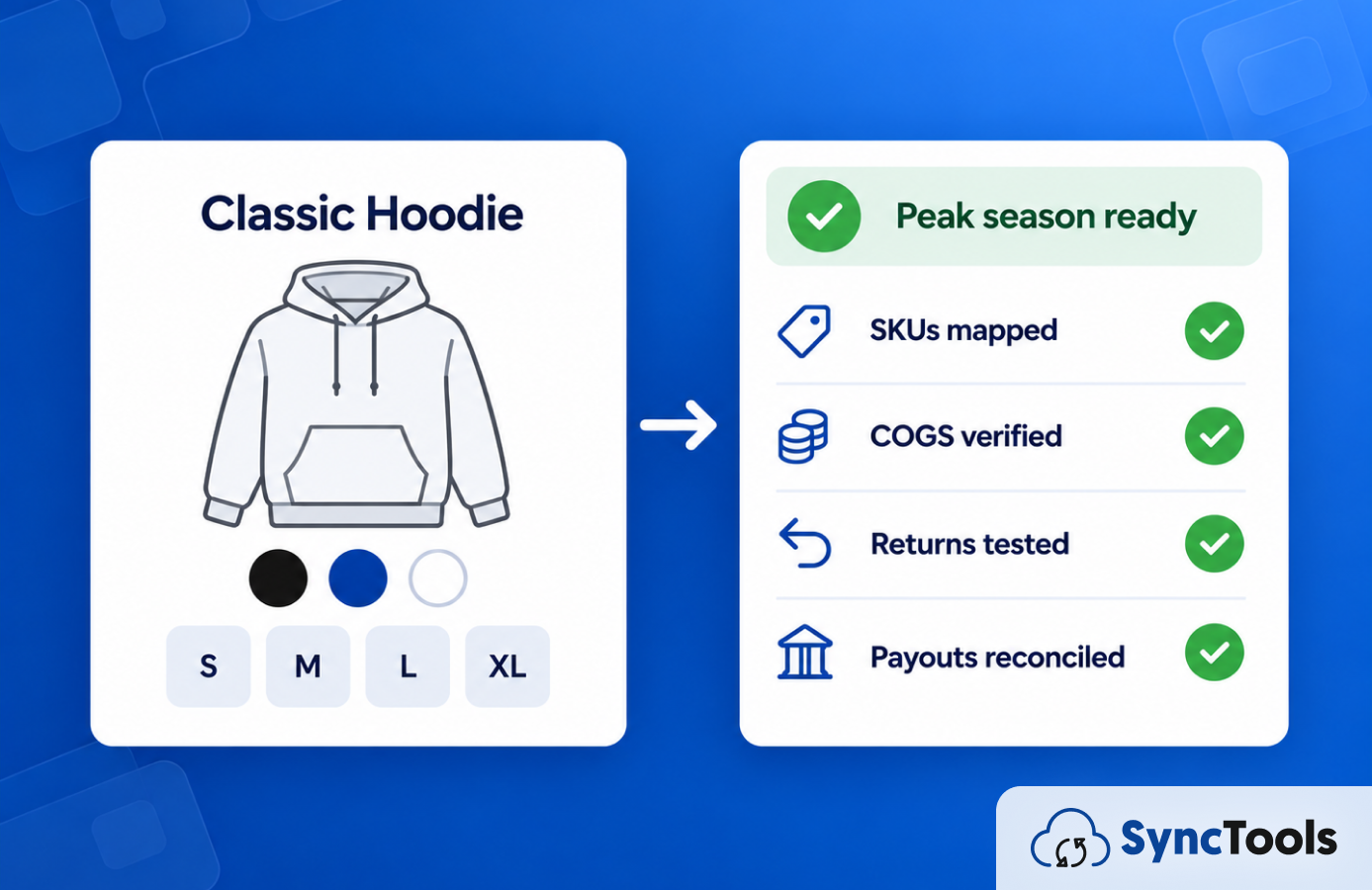
1. Audit Your Product SKUs and Variant Mapping
SKU mapping is one of the most important accounting preparation activities for fashion retailers.
A fashion product usually consists of a parent style and multiple variants.
Consider a hoodie available in three colors and four sizes.
| Product | Color | Size | SKU |
|---|---|---|---|
| Classic Hoodie | Black | S | HD-BLK-S |
| Classic Hoodie | Black | M | HD-BLK-M |
| Classic Hoodie | Black | L | HD-BLK-L |
| Classic Hoodie | Navy | M | HD-NVY-M |
| Classic Hoodie | White | XL | HD-WHT-XL |
Each variant must be identified correctly within the relevant inventory and accounting workflows.
Incorrect SKU mapping can result in:
- Sales attributed to the wrong product
- Incorrect inventory quantities
- Missing or inaccurate COGS
- Difficulties processing exchanges
- Unreliable product profitability reporting
Pre-season SKU checklist:
- Review all active product SKUs.
- Identify missing or duplicate SKU codes.
- Verify size and color variant mappings.
- Check newly introduced seasonal products.
- Confirm discontinued products are handled correctly.
- Review SKU consistency across Shopify, marketplaces, and inventory systems.
- Test whether sample sales are assigned to the correct products.
Practical recommendation: Complete a SKU mapping audit before seasonal collections go live. This reduces the risk of discovering inventory mismatches during promotional campaigns.
For a deeper explanation of apparel variant structures, read the Fashion eCommerce Inventory Accounting Guide.
2. Verify Inventory Valuation and SKU-Level COGS
Cost of Goods Sold (COGS) represents the inventory costs associated with products sold.
For fashion brands, inventory costs may include manufacturing, applicable inbound freight, customs duties, and other directly attributable costs, depending on the business's accounting policies.
Before peak season, verify that product costs are accurate and consistently recorded.
Example: Calculating the cost of a fashion product
Consider a fashion brand selling jackets through Shopify.
| Cost component | Amount per jacket |
|---|---|
| Manufacturing cost | $30 |
| Inbound freight | $4 |
| Import duties | $3 |
| Other eligible inventory costs | $3 |
| Total inventory cost | $40 |
If the jacket sells for $100, its gross profit before other expenses is $60.
However, if the brand offers a 30% Black Friday discount, the selling price becomes $70.
The resulting gross profit falls to $30 before payment fees and other operating expenses.
This illustrates why accurate COGS is essential when evaluating seasonal promotions.
Pre-season COGS checklist:
- Verify current product costs.
- Review applicable landed costs.
- Confirm the inventory costing method.
- Validate SKU-level cost records.
- Check opening inventory values.
- Review outstanding inventory adjustments.
- Identify products with low margins after promotional discounts.
- Confirm that sales and COGS are recorded in the appropriate reporting periods.
Fashion brands should also review older inventory that may require markdowns or inventory write-downs.
A promotional selling-price reduction does not automatically require an inventory write-down. Finance teams should assess inventory values under their applicable accounting standards.
3. Prepare Accounting for Returns and Exchanges
Returns and exchanges are particularly important for fashion eCommerce businesses because customers frequently purchase products in multiple sizes or colors.
A return may affect more than the original payment.
Depending on the transaction, accounting adjustments can involve:
- Sales revenue
- Refund liabilities
- Payment gateway balances
- Sales tax
- Inventory quantities
- COGS
- Return shipping expenses
For example, a customer purchases a jacket for $120 but later returns it because the size is incorrect. The brand may issue a refund or exchange the jacket for another size.
If the original product is returned in sellable condition, the inventory records must reflect its recovery. If it is damaged, a separate inventory assessment may be required.
Pre-season returns checklist:
- Test full refunds.
- Test partial refunds.
- Verify size and color exchange workflows.
- Review refund-related tax adjustments.
- Check inventory restocking procedures.
- Establish accounting procedures for damaged returns.
- Confirm how return shipping and restocking fees are handled.
- Review refunds processed after the original sales period.
Important: A refund does not automatically mean the returned product should be added back to sellable inventory. Its physical condition must be verified.
Fashion brands expecting substantial post-holiday returns should also review whether they need to estimate expected returns under their applicable financial reporting framework.
For detailed treatment of these transactions, refer to the Apparel eCommerce Returns & Refund Accounting Guide.
4. Review Seasonal Discounts and Markdown Accounting
Fashion retailers frequently use promotional pricing to increase sales or reduce seasonal inventory.
Common promotions include:
- Percentage discounts
- Buy-one-get-one offers
- Bundle pricing
- Flash sales
- Clearance discounts
- Loyalty promotions
These campaigns can affect revenue recognition and product profitability.
Before launching a promotion, accounting teams should verify that discounts are captured correctly.
Example: Seasonal discount impact
A fashion brand sells a dress with a regular selling price of $100 and inventory cost of $45.
| Financial metric | Regular sale | Seasonal sale (30% off) |
|---|---|---|
| Selling price | $100 | $70 |
| COGS | $45 | $45 |
| Gross profit | $55 | $25 |
| Gross margin | 55% | 35.7% |
Although the promotional campaign may generate more orders, the gross margin per item decreases considerably.
This does not necessarily mean the promotion is unsuccessful. Higher sales volumes may increase total contribution, but the business needs reliable cost and revenue information to evaluate the outcome.
Pre-season discount checklist:
- Test promotional discount codes.
- Verify discount accounting classifications.
- Review bundle pricing.
- Confirm tax calculations on discounted orders.
- Calculate expected margins for major campaigns.
- Review inventory carrying values for older collections.
- Validate promotional transactions in the accounting system.
5. Validate Payment Gateway Fees and Payout Reconciliation
Fashion brands often receive payments through multiple providers and marketplaces.
These payment sources may deduct fees, refunds, commissions, or other adjustments before transferring funds.
As a result, the amount received in the bank may differ from gross sales.
Example: Shopify payment reconciliation
Consider a fashion retailer with the following settlement activity:
| Settlement component | Amount |
|---|---|
| Gross customer payments | $20,000 |
| Refunds deducted | -$1,000 |
| Payment processing fees | -$600 |
| Other settlement adjustments | -$200 |
| Net payout | $18,200 |
Illustrative example. Actual payout composition varies by payment provider.
Recording only the $18,200 deposit as revenue would hide important information about the underlying transaction activity.
Instead, accounting records should appropriately distinguish sales, refunds, fees, taxes, and settlement balances.
Pre-season payout checklist:
- Review all active payment gateways.
- Verify payment processing fee mappings.
- Reconcile outstanding payment clearing balances.
- Check marketplace commission accounting.
- Review settlement timing.
- Confirm the treatment of payout adjustments.
- Investigate historical reconciliation differences.
- Test reconciliation of sample settlements.
Completing these checks before peak season gives finance teams a more reliable starting position.
6. Check Sales Tax and Multichannel Accounting
Fashion brands selling across multiple regions or marketplaces may encounter different tax rules and reporting requirements.
For example, sales tax treatment can vary based on customer location, product type, marketplace arrangements, and applicable jurisdiction.
Accounting systems should correctly distinguish taxes collected from business revenue.
Pre-season tax checklist:
- Verify relevant tax registrations and obligations.
- Review product tax classifications.
- Check jurisdiction-specific tax mappings.
- Confirm refund-related tax adjustments.
- Review marketplace-facilitator arrangements.
- Test applicable tax calculations on discounted orders.
- Validate tax liability reporting.
Businesses should work with their accountant or tax advisor to confirm relevant obligations before entering new markets or launching significant promotions.
7. Test Your Shopify Accounting Integration Before Sales Increase
An accounting integration should do more than transfer orders successfully.
It should record the relevant components of each transaction in the appropriate accounting categories.
Before peak season, test representative order scenarios.
| Scenario | Accounting validation |
|---|---|
| Regular clothing order | Correct sales and tax entries |
| Discounted product | Correct promotional discount |
| Size exchange | Accurate sales and inventory adjustments |
| Partial refund | Correct refund and tax treatment |
| Returned inventory | Appropriate inventory and COGS adjustment |
| Multiple payment methods | Correct payment and fee mapping |
| Delayed payout | Accurate clearing account balance |
| Failed transaction sync | Error identification without duplicate entries |
Integration readiness checklist:
- Verify recent transaction synchronization.
- Check failed and skipped transactions.
- Validate product mappings.
- Review individual versus summarized accounting requirements.
- Test refund and discount scenarios.
- Verify payout reconciliation.
- Document procedures for investigating errors.
- Assign responsibilities for monitoring accounting exceptions.
For brands using QuickBooks Online or Xero, connecting Shopify with their accounting system can reduce repeated manual data entry.
Connect Shopify to QuickBooks or Xero Before Peak Season
SyncTools automates Shopify order sync, COGS recording, refund mapping, and payout reconciliation into QuickBooks Online and Xero — so your finance team starts peak season on solid footing.
How Returns and Exchanges Affect Fashion Brand Profitability
Fashion brands often evaluate campaign performance using revenue, orders, and conversion rates.
However, returns and exchanges can materially change the final profitability of those sales.
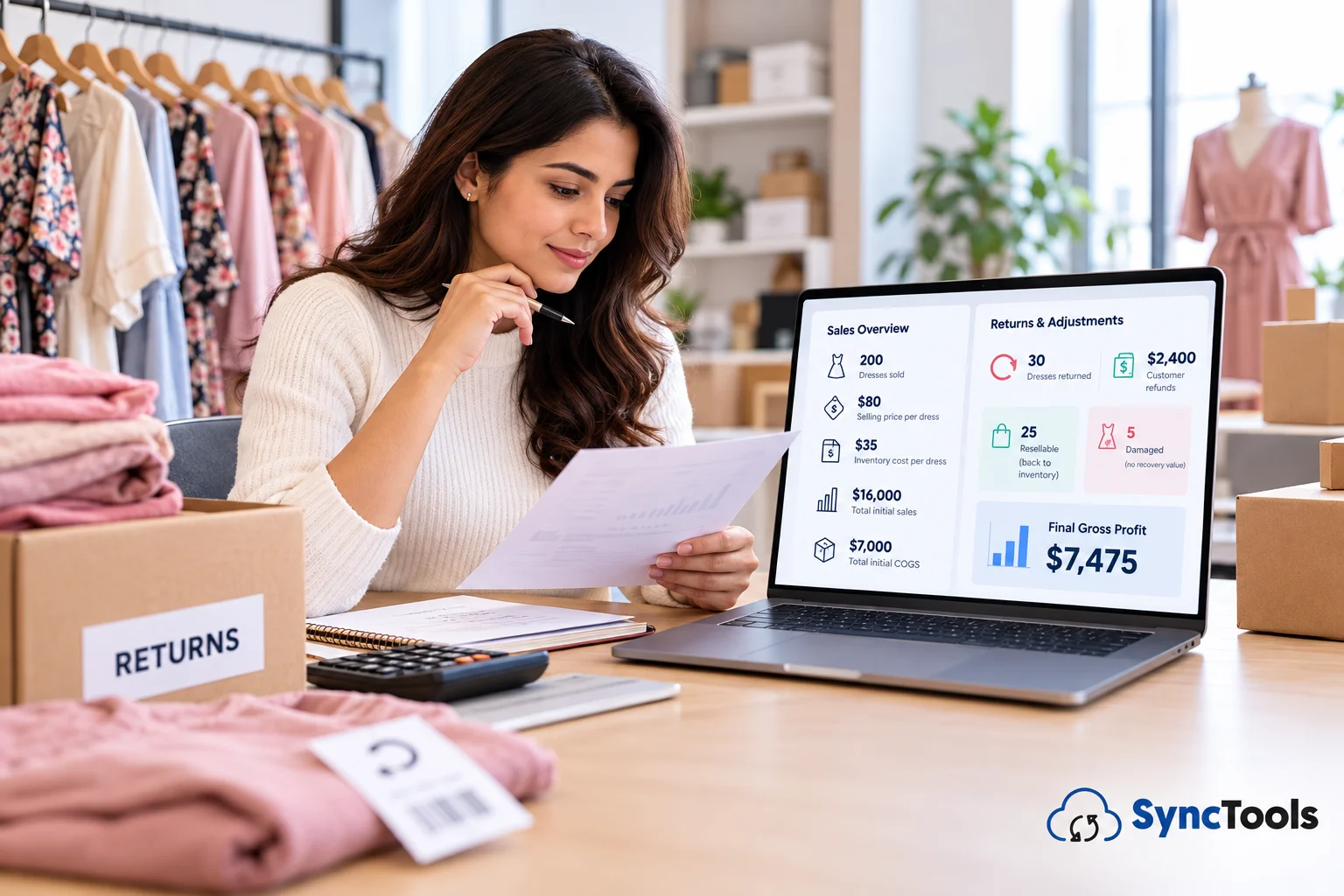
Consider a fashion retailer that sells 200 dresses during a promotional campaign.
Assume:
- Selling price per dress: $80
- Inventory cost per dress: $35
- Total initial sales: $16,000
- Total initial COGS: $7,000
The retailer initially reports $9,000 in gross profit before other expenses.
Now suppose 30 dresses are returned and fully refunded. The business issues $2,400 in refunds.
Of the returned dresses, 25 are resellable and five are damaged beyond resale, with no recovery value.
Assuming the relevant costs are adjusted appropriately, the simplified final position is:
| Metric | Amount |
|---|---|
| Initial sales | $16,000 |
| Customer refunds | -$2,400 |
| Net sales | $13,600 |
| COGS for 170 retained sales | $5,950 |
| Loss on five unsellable returned dresses | $175 |
| Gross profit after these adjustments | $7,475 |
This example excludes payment processing fees, return shipping, restocking expenses, and other operating costs.
It demonstrates why brands should connect refund activity with inventory condition and product costing.
Simply recording the customer refund does not provide the complete financial picture.
Tracking COGS and Profit Margins Across Fashion SKUs
Peak-season campaigns can create substantial differences in product profitability.
Some apparel variants sell quickly at limited discounts, while others require larger markdowns to clear inventory.
Finance teams should therefore analyze profitability beyond total store revenue.
Useful measures include:
SKU-level gross margin: Helps identify which product variants remain profitable after discounts.
Return rate by SKU: Highlights products associated with frequent sizing or quality-related returns.
Sell-through rate: Measures the proportion of available inventory sold during a period.
Inventory aging: Identifies older products that may require markdown or valuation review.
Contribution margin: Evaluates revenue after the relevant variable costs, including payment processing and fulfillment expenses.
These reports help fashion brands make better decisions about future purchasing, promotional pricing, and inventory allocation.
Managing Shopify and Marketplace Payouts During Peak Season
A high volume of orders does not necessarily mean an equivalent amount of cash will immediately appear in a business's bank account.
During peak season, payment settlements may include transactions from multiple days and deductions relating to previous orders.
For example, a Shopify payout received in December may contain transactions originating from late November.
Accounting teams should keep sales activity, payout settlement dates, and bank deposits appropriately reconciled.
A useful payout reconciliation process follows four steps:
Unexplained differences should be investigated rather than absorbed into miscellaneous accounting adjustments.
Daily Accounting Checks During Peak Fashion Sales
Once seasonal promotions begin, accounting teams should monitor exceptions rather than postpone reconciliation until the promotional period ends.
A short daily review can help prevent small issues from becoming a larger month-end backlog.
| Daily accounting check | Purpose |
|---|---|
| Transaction synchronization | Identify missing or failed transactions |
| SKU mapping | Detect products assigned to incorrect records |
| Refund processing | Review incomplete or unmatched refunds |
| Payment gateway fees | Identify unexpected deductions |
| Payout reconciliation | Track deposits and outstanding balances |
| Inventory and COGS | Review unusual quantity or cost differences |
| Accounting exception report | Resolve problems before they accumulate |
The frequency of each check should match the business's transaction volume and operational risk.
Post-Peak Season Fashion Accounting Reconciliation Checklist
The end of a promotional campaign does not necessarily mean all associated financial activity is complete.
Payouts may still be pending, customers may initiate returns, and inventory adjustments may require review.
Use the following checklist after the sales period:
- Reconcile all available marketplace and gateway settlements.
- Identify outstanding payment clearing balances.
- Review pending customer refunds.
- Verify returned inventory quantities and condition.
- Reconcile recorded COGS with sales and inventory activity.
- Review unsold and slow-moving seasonal inventory.
- Assess whether inventory write-downs are necessary.
- Validate sales tax balances.
- Review product-level and channel-level profitability.
- Document outstanding accounting exceptions.
- Complete the relevant reporting period close.
For campaigns close to year-end, finance teams should also carefully review transaction cutoff dates and returns-related reporting requirements.
Common Fashion eCommerce Accounting Mistakes to Avoid
Even established fashion brands can encounter accounting errors during peak sales periods.
| Accounting mistake | Potential impact | Preventive action |
|---|---|---|
| Missing variant-level SKUs | Incorrect inventory and cost records | Audit SKU mappings |
| Outdated product costs | Unreliable gross profit | Verify inventory costs |
| Treating refunds only as cash movements | Incomplete revenue and inventory adjustments | Connect refund and inventory accounting |
| Recording net payouts as sales | Misstated revenue and expenses | Reconcile gross activity and fees |
| Incorrect discount accounting | Unreliable margin analysis | Test promotional transactions |
| Ignoring damaged returns | Overstated recoverable inventory | Review return condition |
| Delaying reconciliation | Larger accounting backlogs | Monitor exceptions regularly |
The most practical prevention strategy is to test the accounting workflow before promotional transactions increase.
How SyncTools Helps Fashion Brands Prepare for Peak Season
Fashion brands frequently manage accounting information across Shopify, marketplaces, inventory systems, payment processors, and accounting software.
When information is transferred manually between these systems, increased transaction volumes can create additional bookkeeping work.
SyncTools is an eCommerce accounting automation platform that connects supported sales channels with accounting systems such as QuickBooks Online and Xero.
Depending on the integration and configuration, SyncTools supports workflows involving:
Product Mapping
SyncTools helps organize product-related transaction information according to configured accounting mappings, reducing the need for repetitive manual categorization.
COGS Accounting
Supported COGS workflows help businesses record product costs alongside relevant sales activity, improving the information available for financial reporting.
Refund and Discount Mapping
SyncTools helps transfer supported refund and discount information into accounting workflows so these adjustments are not overlooked.
Payment Fees and Payout Reconciliation
By organizing payment-related transactions, deductions, and settlements, SyncTools can help finance teams investigate payout differences and reconcile accounting balances.
QuickBooks Online and Xero Integrations
Fashion businesses using supported integrations can connect eCommerce transaction data with their accounting software.
Depending on configuration, individual or summarized accounting records can be used to support different reporting requirements.
For peak-season preparation, the value of automation is not simply processing more orders. It is helping finance teams maintain consistent accounting records as transaction complexity increases.
Automation still requires appropriate configuration, financial review, and reconciliation controls.
Fashion eCommerce Accounting Readiness Checklist
Use this final checklist to organize accounting preparation before, during, and after peak season.
Before Peak Season
- Audit product and variant SKU mappings.
- Verify inventory balances and COGS.
- Test promotional discounts.
- Validate refund and exchange accounting.
- Review payment gateway fee mappings.
- Reconcile outstanding payouts.
- Verify sales tax configurations.
- Test accounting integrations.
During Peak Season
- Monitor transaction synchronization.
- Review failed or duplicate entries.
- Track refunds and exchanges.
- Validate product mapping.
- Review payment settlements.
- Investigate accounting exceptions.
- Monitor margins and significant inventory discrepancies.
After Peak Season
- Reconcile outstanding marketplace payouts.
- Verify refunds and chargebacks.
- Review returned inventory.
- Reconcile COGS.
- Assess slow-moving inventory.
- Validate tax liabilities.
- Calculate product and channel profitability.
- Complete the accounting period close.
Frequently Asked Questions
How should fashion brands prepare accounting before peak season?
Fashion brands should review SKU mapping, inventory costs, refund workflows, discounts, payment gateway fees, and accounting integrations before seasonal sales begin. They should also reconcile outstanding transactions and establish procedures for monitoring exceptions.
How do returns affect COGS in fashion eCommerce?
Returns can require adjustments to previously recognized COGS and inventory, depending on the condition of the returned products and the applicable accounting treatment. Damaged or unsellable merchandise may require additional inventory adjustments or losses.
How do you track COGS for different clothing sizes and colors?
Maintain accurate SKU-level inventory records, assign appropriate product costs, and use a consistent inventory costing method. The accounting system should connect sold variants with their corresponding inventory costs.
How should Shopify payouts be reconciled?
Shopify payout reconciliation generally involves recording underlying sales activity, refunds, taxes, and processing fees, then matching the resulting settlement amount with the corresponding bank deposit.
How do seasonal discounts affect fashion brand profitability?
Discounts reduce the amount earned per product while inventory costs may remain unchanged. Brands should review gross margins and relevant operating costs to determine whether increased sales volume compensates for reduced selling prices.
Can fashion eCommerce accounting be automated?
Yes. Supported eCommerce accounting integrations can automate the transfer and categorization of sales, discounts, refunds, fees, payouts, and COGS information. Appropriate review and reconciliation are still necessary to maintain accurate books.
Get Your Fashion eCommerce Accounting Ready Before Peak Season
Peak season offers significant sales opportunities for fashion and apparel brands, but the financial benefits depend on accurate accounting.
Product variants, promotional discounts, refunds, inventory costs, and delayed payouts can all affect reported profitability.
Preparing these accounting workflows before order volumes increase helps businesses reduce avoidable corrections and maintain better visibility into financial performance.
Map this process: eCommerce platform → transaction data → account mapping → accounting system → payout reconciliation → accountant review
SyncTools helps eCommerce businesses connect supported sales channels with QuickBooks Online and Xero, organize transaction data, and reduce repetitive accounting work.
<<<<<<< HEAD =======Before your next seasonal campaign, review your product mappings, validate your COGS, test refund scenarios, and check payout reconciliation.
>>>>>>> 4b578554b0607f59522a235b010213f6142ab536Ready to automate your accounting?
Connect Shopify, WooCommerce, or Linnworks to QuickBooks, Xero & more. Setup in minutes.