Shopify Payout Reconciliation for High-Volume Stores: A Practical Guide to Accurate Ecommerce Accounting

For high-volume Shopify stores, managing hundreds or thousands of orders also means handling more financial transactions.
While sales and payouts may be recorded regularly, reconciling Shopify sales reports with actual bank deposits can reveal differences that require closer examination.
These differences do not always indicate accounting errors.
Shopify payouts reflect settled transactions, which may include deductions for processing fees, refunds, chargebacks, and other adjustments.
Payment methods and settlement timelines can also influence the final amount deposited.
For finance teams, reconciliation involves more than verifying bank deposits. It requires accurate accounting for revenue, taxes, payment fees, refunds, and cost of goods sold (COGS).
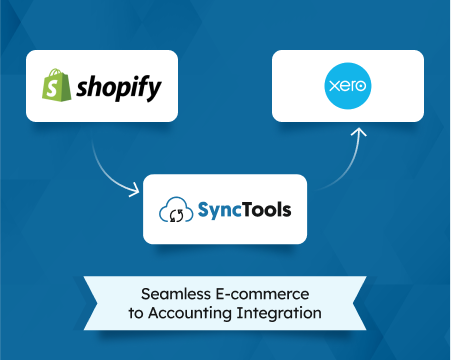
This guide covers the Shopify payout reconciliation process, common challenges high-volume stores face, and how SyncTools integrations with QuickBooks Online and Xero can support more structured accounting and reconciliation workflows.
What Is Shopify Payout Reconciliation?
Shopify payout reconciliation matches Shopify Payments settlement records with accounting entries and the corresponding deposits received in a business bank account.
It verifies that the transactions making up each payout have been correctly classified and recorded.
A complete reconciliation addresses three questions:
- Does the Shopify payout amount agree with the relevant settlement transactions?
- Does the accounting system reflect the correct sales, taxes, fees, refunds, and adjustments?
- Does the bank deposit match the expected payout, with any timing differences or exceptions explained?
For stores using multiple payment gateways, the process must distinguish Shopify Payments settlements from payments processed independently by providers such as PayPal or other external gateways.
Example: Why Shopify Sales and Bank Deposits Differ
Consider an illustrative Shopify Payments settlement.
| Settlement component | Amount (USD) |
|---|---|
| Captured customer payments, including applicable taxes | $100,000 |
| Less: payment processing fees | -$2,900 |
| Less: customer refunds | -$5,000 |
| Less: chargebacks and other settlement deductions | -$600 |
| Expected Shopify payout | $91,500 |
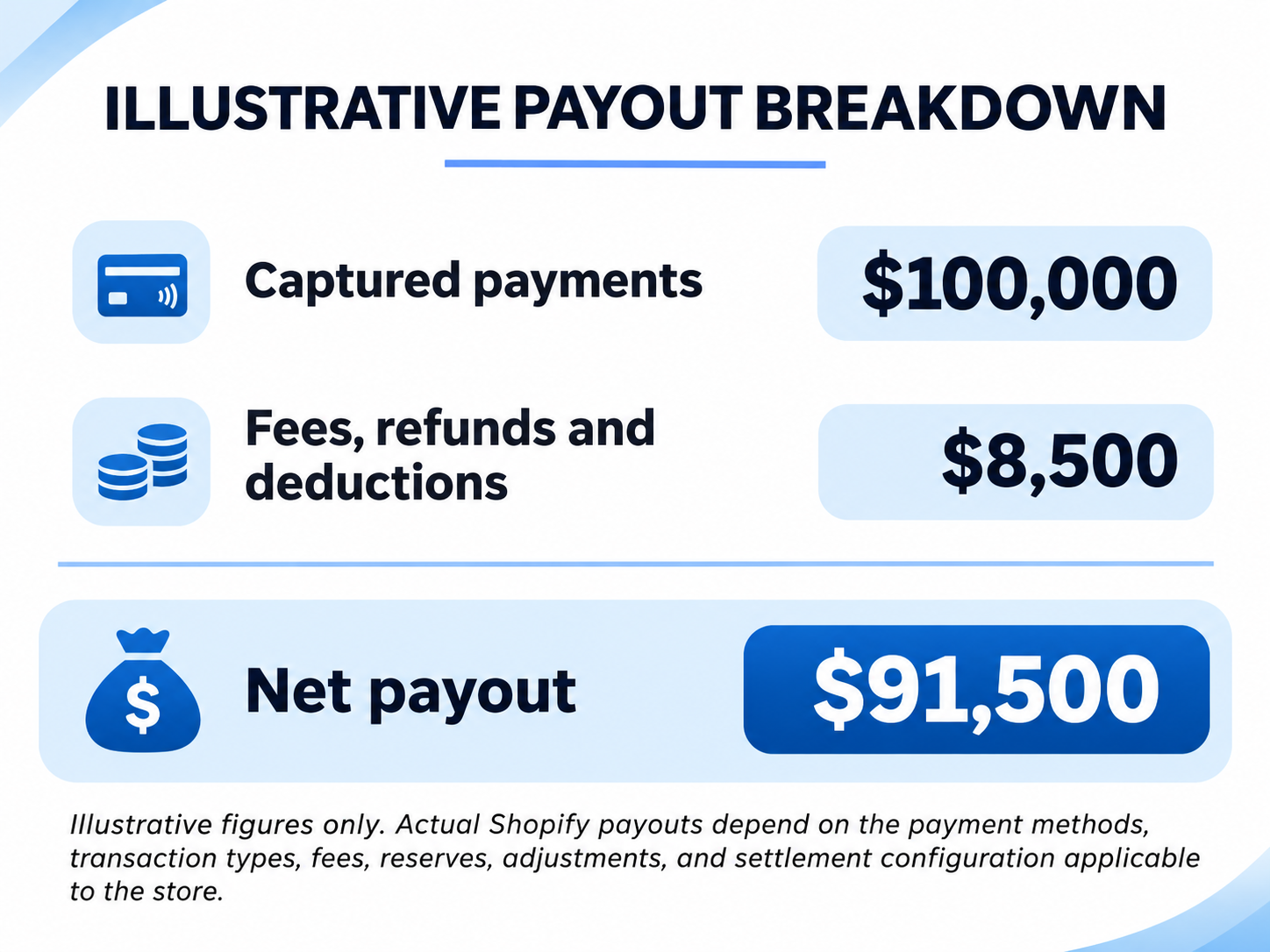
The $8,500 difference is not automatically missing revenue.
However, recording only the $91,500 bank deposit as sales revenue would omit important accounting information.
The finance team must separately account for applicable revenue, taxes, fees, refunds, and other settlement adjustments.
Why Shopify Payout Reconciliation Becomes Difficult at High Order Volumes
A small Shopify store might reconcile a limited number of settlements using spreadsheets. As transaction volumes increase, the same approach creates operational and financial reporting risks.
1. A Single Payout May Include Sales From Multiple Dates
Shopify groups eligible transactions into payouts based on its settlement schedule. As a result, payments collected over several days may be included in a single bank deposit.
For example, an order completed at the end of October might not be settled until November. Such timing differences can explain why daily Shopify sales figures do not match the deposits recorded on the same date.
Accounting implication: Record and reconcile revenue recognition and payment settlements separately.
2. Refunds Can Affect a Different Accounting Period
Refunds do not always occur in the same reporting period as the original purchase. A customer who places an order in October may return the product in November, after the initial payment has already been settled.
In this situation, the sale and subsequent refund fall in different accounting periods and may appear in separate payout records.
Finance teams must account for the refund against the original transaction, including any applicable tax adjustments, while ensuring the corresponding settlement records remain accurate.
3. Payment fees reduce the settlement amount
Shopify Payments processing fees affect the net payout, but they generally require separate expense classification.
If you don't record these fees properly, the business may lose visibility into payment processing costs.
4. Multiple payment gateways create separate settlement flows
A Shopify checkout can involve Shopify Payments, PayPal, and other supported payment methods.
Not every transaction necessarily enters the same Shopify Payments payout.
For reconciliation purposes, payment gateways should have distinct settlement tracking where appropriate.
5. Discounts, taxes, and COGS require different accounting treatment
A Shopify order may contain product revenue, shipping income, promotional discounts, collected taxes, and inventory-related costs.
These components serve different purposes in the general ledger.
COGS affects profitability and inventory accounting, but it is not ordinarily a deduction from a Shopify Payments payout.
6. High transaction volumes make exception detection harder
A finance team processing thousands of transactions may encounter duplicate imports, missing refunds, incorrect account mappings, settlement timing differences, or unexpected adjustments.
Without transaction references and reconciliation controls, identifying the source of a discrepancy becomes time-consuming.
Shopify Payout Reconciliation Workflow: From Sales to Accounting
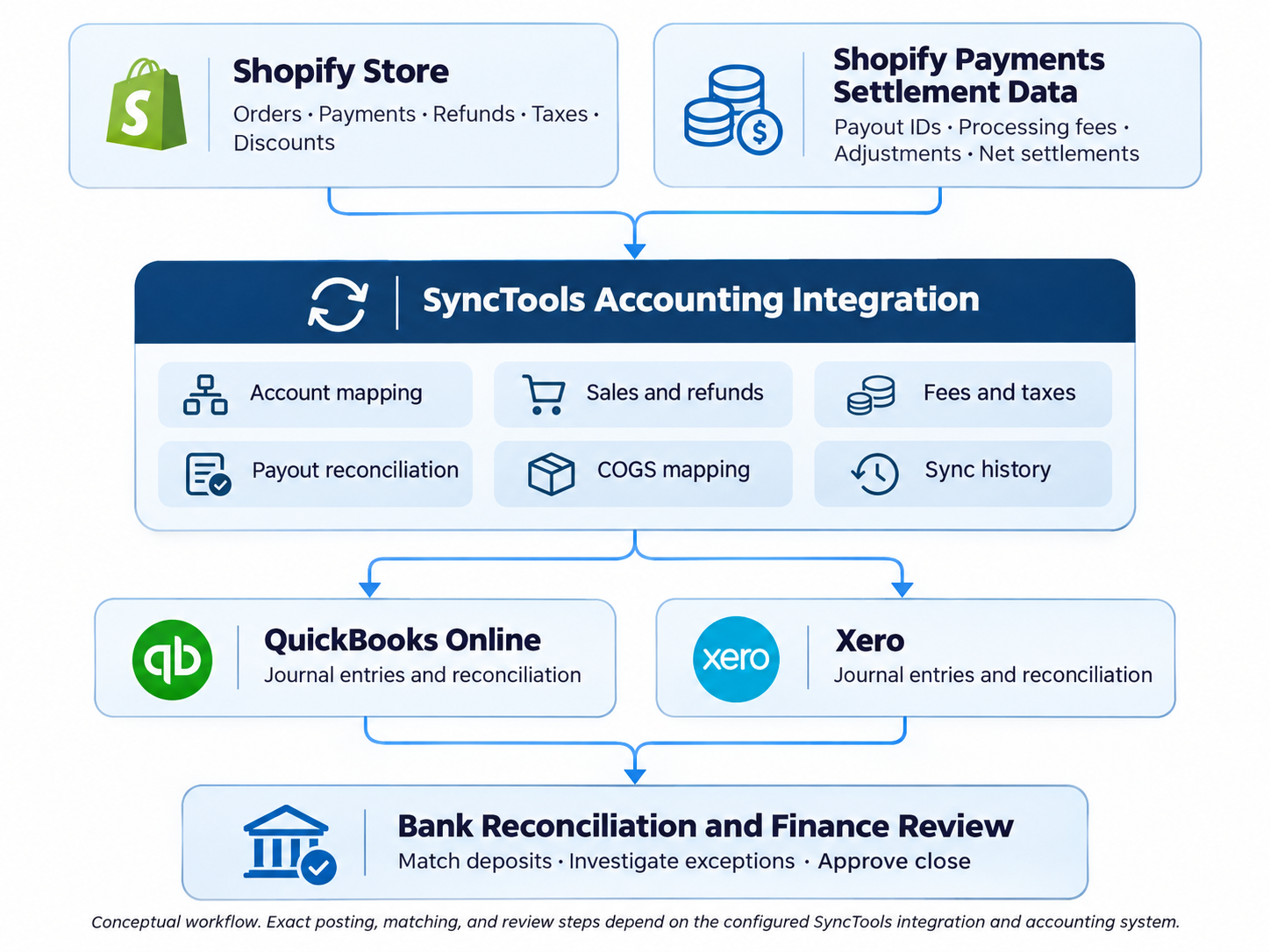
For high-volume stores, reconciliation should follow a structured process that connects Shopify transactions, settlement activity, accounting entries, and bank deposits.
How to Reconcile Shopify Payouts Step by Step
Step 1: Retrieve Shopify payout details
Open Shopify Admin and navigate to Finance, then Payouts.
Select the payout you want to reconcile and review its payout ID, settlement amount, associated transactions, fees, refunds, adjustments, and status.
Shopify also supports transaction exports for specific payouts, which can help finance teams investigate discrepancies.
Shopify Help Center+1
Step 2: Validate the settlement calculation
Recalculate the payout using the actual transaction types included in the settlement.
Compare the calculated net amount with Shopify's payout record. Investigate differences before treating them as accounting adjustments.
Step 3: Map transactions to accounting accounts
Configure the accounting treatment for sales, shipping income, discounts, sales taxes, refunds, fees, and other adjustments.
Ensure the treatment follows the business's accounting policies and applicable tax requirements.
Step 4: Use a payment clearing account
A clearing account helps separate recorded customer payments from the eventual bank deposit.
For example, an illustrative $10,000 payment batch with $300 in processing fees could be recorded as:
| Accounting entry | Debit | Credit |
|---|---|---|
| Shopify clearing account | $10,000 | |
| Sales and applicable tax accounts | $10,000 | |
| Processing fee expense | $300 | |
| Shopify clearing account | $300 | |
| Bank account | $9,700 | |
| Shopify clearing account | $9,700 |
Distribute the initial credit between revenue and applicable tax liability accounts. This example assumes the customer payment has been captured and the related sale has not been recorded previously.
This approach lets you reconcile the $9,700 bank deposit without recording it again as additional revenue.
Step 5: Match the bank deposit
Verify the payout amount against the corresponding bank transaction, checking the payment reference, currency, and settlement date to confirm that the records align.
Shopify notes that bank processing can take an additional one to three business days after a payout is sent, depending on the bank.
Understanding Shopify Payments payout timing
Step 6: Review exceptions and close the period
Investigate unmatched payouts, duplicated entries, unresolved clearing balances, incorrect tax mappings, and missing transaction references.
Document any adjustments and obtain the required accounting approval before finalizing the reporting period.
How SyncTools Supports Shopify Payout Reconciliation
SyncTools provides an accounting integration layer between Shopify and supported accounting platforms.
Its published Shopify integration documentation describes synchronization of sales, refunds, taxes, fees, COGS, and payout information with QuickBooks Online and Xero.
Shopify to QuickBooks Online
The SyncTools Shopify QuickBooks integration supports individual transaction synchronization and summarized journal entries.
For high-volume merchants, summarized posting can reduce accounting entries while preserving supporting transaction information for review.
The integration also supports account mapping, payout reconciliation, and product or category-level accounting configuration.
Shopify to Xero
The SyncTools Shopify Xero integration supports transaction mapping, payout-related accounting, refunds, taxes, and configurable synchronization methods.
Finance teams can use these capabilities to organize Shopify settlement information within their Xero accounting workflow.
Individual vs. Summarized Synchronization
| Consideration | Individual sync | Summarized sync |
|---|---|---|
| Accounting detail | Individual transactions | Aggregated entries |
| Ledger volume | Higher | Lower |
| Order-level visibility | Directly in accounting records | Through supporting detail |
| Typical use case | Detailed customer or order accounting | High-volume financial posting |
| Reconciliation | Transaction-level review | Summary plus supporting records |
For high-volume stores, summarized synchronization is often worth evaluating, provided the business retains sufficient transaction-level evidence for reconciliation, tax reporting, and audit review.
SyncTools also documents sync history and posting review features. Verify the specific workflow against the merchant's selected integration and configuration.
Industry-Specific Shopify Accounting Challenges
Different ecommerce industries introduce different reconciliation requirements.
| Industry | Common accounting challenge | Recommended focus |
|---|---|---|
| Fashion and apparel | High return volumes, discounts, seasonal promotions | Refund mapping and sales adjustments |
| Health and beauty | Bundles, subscriptions, promotional offers | Revenue classification and payment tracking |
| Consumer electronics | High-value returns, warranties, multiple SKUs | Refunds, inventory and COGS accuracy |
| Home and furniture | Freight charges, partial refunds, delayed fulfillment | Shipping income, refunds and reporting cutoffs |
| Sports and outdoor | Seasonal demand, bundled products, multiple channels | Product mapping and channel-level profitability |
These are accounting workflow considerations, not claims that every industry-specific scenario is automatically handled without configuration.
Common Shopify Payout Reconciliation Mistakes
Even when businesses use accounting software, incorrect reconciliation practices can affect financial reporting.
Recording net payouts as sales: This can understate sales and conceal processing expenses.
Reconciling by order date alone: Match payouts using settlement records rather than assuming sales and deposits occur on the same date.
Mixing payment gateways: Independently settled PayPal or other gateway transactions should not be incorrectly included in Shopify Payments payouts.
Ignoring outstanding clearing balances: Unexplained balances may indicate timing differences, missing entries, or incorrect mappings.
Treating COGS as a payout deduction: COGS belongs in inventory and profitability accounting, not the payment processor's settlement calculation.
Assuming every difference is an error: Shopify distinguishes payout activity from sales reporting. Different timing and reporting definitions can produce legitimate differences.
Shopify Payments activity report
Shopify Reconciliation Checklist for Finance Teams
Use this checklist before completing a reporting period.
Period-Close Readiness
- Shopify payout totals agree with underlying settlement transactions
- Payment processing fees are correctly classified
- Refunds and chargebacks have been reviewed
- Payment gateways are reconciled separately
- Sales tax and other liabilities are correctly mapped
- Bank deposits match expected settlement amounts
- Unsettled and reserved funds are identified
- Clearing account balances are explained
- COGS and inventory entries are reviewed separately
- Reconciliation exceptions and approvals are documented
Review outstanding items before period close.
When Should a Shopify Store Automate Payout Reconciliation?
As Shopify transaction volumes increase, manual reconciliation can become difficult to manage, especially when businesses need accurate, timely financial reporting.
Frequent payout discrepancies, multiple payment gateways, repeated spreadsheet corrections, longer month-end closing cycles, and challenges in tracking transactions are common signs that an automated approach may be beneficial.
However, order volume alone should not determine the need for automation. Finance teams should also consider transaction complexity, how often reconciliation issues occur, reporting requirements, and the resources spent on manual processes.
Before implementation, businesses can test the integration against a selected accounting period, verify account mappings, investigate discrepancies, and compare the results with existing financial records.
Conclusion: Build a Reconciliation Process That Scales With Shopify Sales
High-volume Shopify accounting requires more than matching deposits with sales totals.
An effective reconciliation process connects settlement transactions to the general ledger, separates revenue from payment fees and liabilities, and clearly explains outstanding balances.
SyncTools supports this process through Shopify accounting integrations with QuickBooks Online and Xero, including transaction synchronization, account mapping, and configurable posting workflows.
For growing ecommerce businesses, the goal isn't simply to automate bookkeeping. It is to maintain reliable financial information as transaction volumes and accounting requirements become more complex.
Frequently Asked Questions
Why don't Shopify payouts match sales reports?
Shopify payouts reflect settlement activity, while sales reports reflect order and sales activity. Processing fees, refunds, adjustments, settlement timing, and payment methods can create differences.
Can Shopify payouts be reconciled automatically in QuickBooks?
Yes. Accounting integrations such as SyncTools support Shopify payout-related synchronization and reconciliation workflows in QuickBooks Online. Correct account mapping and exception review remain important.
How do I reconcile Shopify payouts in Xero?
Use Shopify settlement details to validate the net payout, record the relevant accounting components, and match the resulting settlement entry against the bank transaction in Xero.
Should high-volume Shopify stores use summarized journal entries?
Summarized entries can be appropriate when the finance team needs lower ledger volume. The chosen method must still provide adequate transaction-level supporting records and meet reporting requirements.
Does Shopify payout reconciliation include COGS?
COGS should be accounted for as part of the overall ecommerce accounting process, but it is not ordinarily deducted from Shopify Payments settlements.
Can Shopify payouts contain transactions from different dates?
Yes. Shopify may group transactions into payouts based on settlement timing rather than the original order date.
Ready to automate your accounting?
Connect Shopify, WooCommerce, or Linnworks to QuickBooks, Xero & more. Setup in minutes.