UAE e-Invoicing for Shopify, WooCommerce & Marketplace Sellers: How Ecommerce Data Needs to Flow
An ecommerce business can process hundreds of orders, receive customer payments, reconcile marketplace settlements, and maintain its accounting records without knowing whether all the information needed for an electronic invoice remains accessible.
Consider a UAE-based business selling through Shopify, WooCommerce, and Amazon.
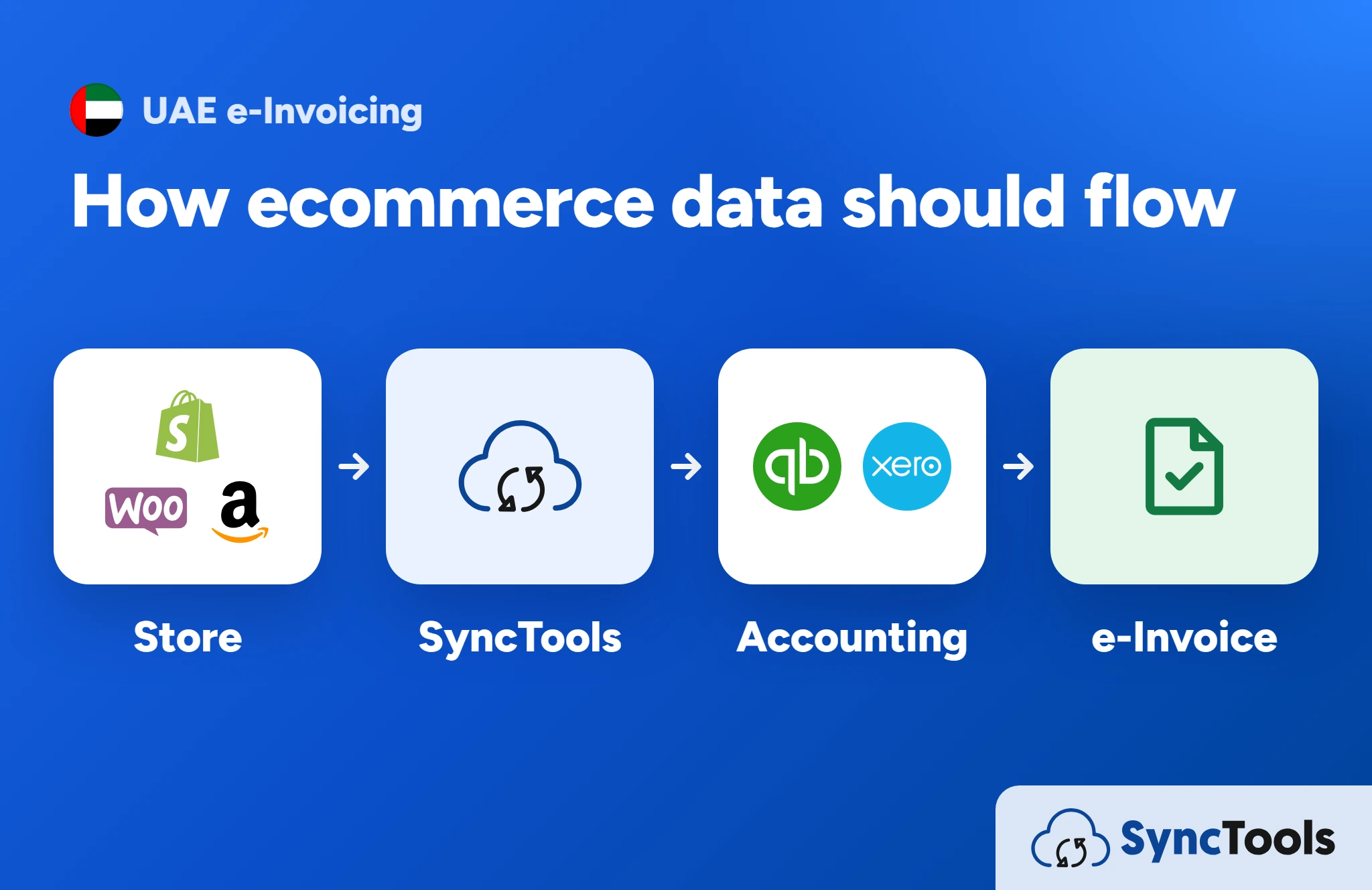
Shopify holds individual customer orders. WooCommerce manages wholesale transactions. Amazon provides settlement reports containing sales, refunds, commissions, and other deductions. QuickBooks or Xero records the financial activity.
Each system may be working correctly, yet the business could still struggle to connect an invoice to its original transaction, customer details, tax treatment, and accounting entry.
The challenge is not simply moving data between applications. It is ensuring that the right information remains available, accurate, and traceable throughout the transaction lifecycle.
As UAE e-Invoicing requirements take effect, this becomes particularly relevant for businesses handling qualifying transactions across multiple ecommerce channels.
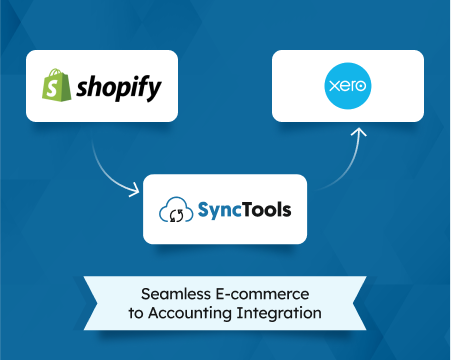
This guide examines how ecommerce data should move between storefronts, marketplaces, accounting systems, invoicing applications, and Accredited Service Providers (ASPs). It also explains where SyncTools can support financial data synchronization and reconciliation.
For regulatory deadlines, business applicability, and broader compliance preparation, read our UAE e-Invoicing 2027 guide.
1. Why Ecommerce Data Flow Matters for UAE e-Invoicing
Every ecommerce transaction creates several types of records.
An online store records what was purchased. A payment provider processes the collection. A marketplace may administer payments and deductions. An accounting system records the financial impact.
An invoicing application, meanwhile, needs the relevant transaction information to prepare the applicable electronic invoice.
These systems have different responsibilities.
| System | Primary responsibility | Relevant information |
|---|---|---|
| Shopify or WooCommerce | Ecommerce transactions | Customers, products, order lines, prices, discounts, taxes |
| Amazon or other marketplaces | Marketplace transaction management | Orders, returns, settlement reports, fees |
| Payment providers | Payment processing | Collections, refunds, transaction references |
| SyncTools | Supported ecommerce accounting integration | Sales, taxes, refunds, fees, accounting mappings, settlements |
| QuickBooks, Xero or ERP | Financial accounting | Ledgers, receivables, tax accounts, reconciliations |
| Invoicing application and ASP | Applicable electronic invoice processing | Required invoice fields, validation, structured exchange |
The important distinction is that accounting data and electronic invoice data are related, but they are not interchangeable.
For example, an accounting system might contain a summarized daily sales entry worth AED 25,000.
That entry may be appropriate for a configured financial reporting workflow. However, it does not necessarily contain the buyer identities, product descriptions, quantities, and tax details associated with every underlying sale.
If an in-scope transaction requires a structured electronic invoice, the relevant invoice information must remain accessible to the responsible invoicing solution.
Three questions every ecommerce finance team should answer
- Where does the original transaction information reside?
- Which information reaches accounting, and which remains in the source application?
- How will the invoicing environment access and validate the necessary fields?
These questions establish the foundation for an effective ecommerce data architecture.
Read the UAE e-Invoicing 2027 Guide
2. How Ecommerce Data Should Flow Between Systems
There is no single technical architecture suitable for every ecommerce business.
The correct design depends on its sales channels, legal entities, customer types, accounting applications, invoicing arrangements, and supported integrations.
However, a practical architecture separates five responsibilities.
Stage 1: Ecommerce platforms capture transactions
Shopify, WooCommerce, and marketplaces generate transaction information, including order references, customer details, products, quantities, discounts, shipping, and applicable taxes.
Businesses need to identify which source records are authoritative.
Stage 2: Accounting integration organizes financial activity
Supported accounting integration software, such as SyncTools, can help transfer and categorize relevant ecommerce financial information into accounting systems.
Depending on the integration and configuration, this can include sales, refunds, fees, taxes, and settlement activity.
Stage 3: Accounting and invoicing systems maintain their respective records
Accounting systems manage financial records, while the responsible invoicing application must obtain the information needed to prepare applicable electronic invoices.
Businesses should not assume that all required invoice data is available simply because an accounting transaction has been posted successfully.
Stage 4: The invoicing solution connects with the appointed ASP
The responsible invoicing environment must prepare the structured information required by the UAE framework and establish the appropriate connection with an Accredited Service Provider.
Invoice validation and regulated transmission require a compliant arrangement.
Stage 5: Invoice exchange and accounting reconciliation remain connected
Electronic invoice processing and financial reconciliation should be treated as separate but related workflows.
A successful invoice exchange does not automatically prove that the associated payment has been collected or reconciled.
Likewise, a reconciled bank deposit does not establish that an electronic invoice contains every required field.
Key architectural principle: SyncTools supports the ecommerce accounting data layer. It is not presented as a UAE-accredited ASP or as a replacement for a compliant electronic invoicing solution.
3. Where Ecommerce Data Can Be Lost or Misinterpreted
Data problems do not always occur because an integration fails.
Sometimes data moves successfully but loses important context during transformation.
Problem 1: Multiple transactions become one accounting summary
A store processes 150 orders and creates a summarized daily accounting entry.
The accounting totals may reconcile correctly, but the entry might not identify the individual business customers, purchased products, or original invoice references.
What to verify: Whether transaction-level source records remain available to the invoicing system.
Problem 2: Customer information is incomplete
A WooCommerce wholesale customer enters a company name and email address, but the checkout does not collect all the business identifiers required for the relevant invoice.
Accounting may still record the sale, while electronic invoice preparation requires additional information.
What to verify: Whether buyer records contain the applicable mandatory and conditional fields.
Problem 3: Refund records lose their original references
A customer purchases an item in August and returns it in September.
The accounting platform records the refund, but the original invoice reference may not be carried into the relevant adjustment workflow.
What to verify: Whether the refund can be connected to the underlying transaction and any applicable credit note.
Problem 4: Payouts are mistaken for sales
A marketplace transfers AED 45,000 after deducting commissions, returns, and service charges.
If the complete bank receipt is incorrectly recorded as revenue, the business can lose visibility into gross sales and the associated deductions.
What to verify: Whether sales and settlement components are correctly classified and reconciled.
Problem 5: Different legal entities share one reporting workflow
A multichannel business operates through multiple registered companies but combines transaction reports without reliable entity identifiers.
This can complicate supplier identification, tax accounting, and invoice preparation.
What to verify: Whether each transaction is assigned to the correct legal entity before downstream processing.
4. Shopify UAE e-Invoicing: How Order Data Should Be Mapped
Shopify merchants often use accounting integrations to manage financial reporting across large numbers of orders.
However, businesses that also serve wholesale or corporate buyers need to pay particular attention to how customer and transaction information is maintained.
Shopify order-to-invoice data mapping
| Shopify information | Downstream purpose | Validation question |
|---|---|---|
| Customer information | Buyer identification | Can business buyers be identified correctly? |
| Order ID | Transaction traceability | Is the original order reference preserved? |
| Product descriptions | Invoice line information | Are descriptions sufficiently detailed? |
| Quantities and prices | Transaction values | Do line totals reconcile with the order? |
| Discounts | Financial and tax treatment | Are discounts classified correctly? |
| Shipping charges | Transaction calculation | Is the applicable tax treatment correct? |
| Tax details | Invoice and accounting tax information | Are rates, categories, and amounts consistent? |
| Refund details | Adjustments and credit notes | Can refunds be traced to original transactions? |
| Payment and payout references | Reconciliation | Can collections be matched appropriately? |
This is a practical mapping framework, not the complete UAE PINT-AE field specification.
Example: A Shopify business selling wholesale and retail
Imagine a Shopify electronics merchant receives two orders.
Order A: An individual customer purchases accessories for personal use.
Order B: A UAE corporate customer purchases 80 accessories for business use.
Both transactions originate from Shopify, but the invoicing requirements may differ according to the nature of the supply and the applicable rules.
The merchant's data architecture should preserve the information needed to classify the transactions correctly.
The accounting workflow must also distinguish the financial components without assuming that every transaction requires the same electronic invoice process.
Where SyncTools contributes
For supported Shopify accounting integrations, SyncTools helps businesses manage financial data synchronization, account mapping, and payout reconciliation.
This supports the accounting side of the transaction lifecycle.
Businesses must separately verify how their invoicing solution obtains the complete information needed for regulated electronic invoice processing.
Explore Shopify Accounting Integrations
5. WooCommerce UAE e-Invoicing: Why Plugin Configuration Matters
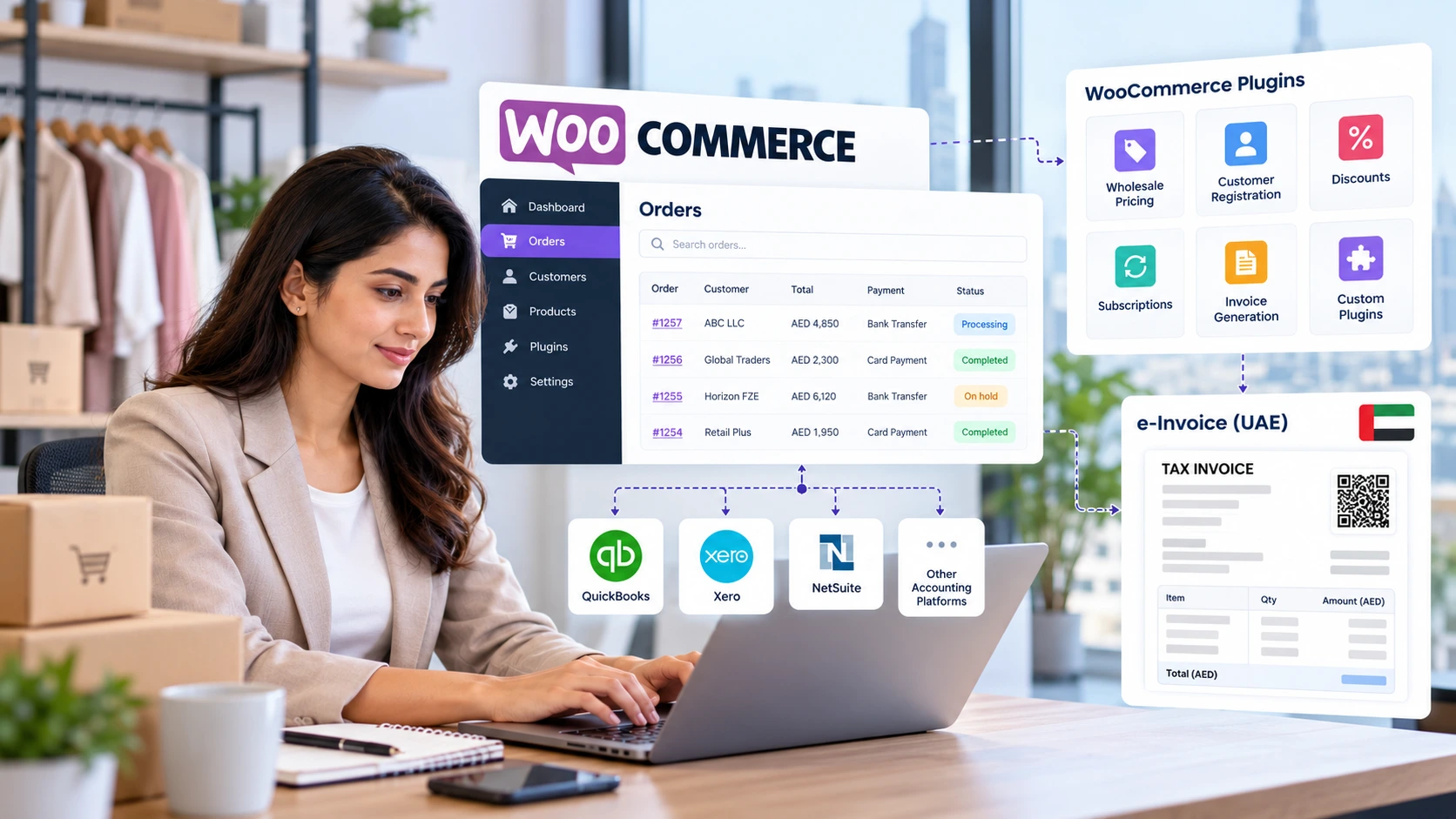
WooCommerce presents a different integration challenge because merchants can customize their checkout, customer records, tax handling, and invoicing processes.
A WooCommerce business might use separate plugins for wholesale pricing, customer registration, discounts, subscriptions, and invoice generation.
These components do not necessarily maintain information in identical formats.
Example: A WooCommerce B2B distributor
A UAE distributor accepts corporate orders through WooCommerce.
The customer receives negotiated pricing, enters a purchase order number, and completes the transaction through a bank transfer.
The business must determine:
- Whether the customer record contains the necessary business information.
- Where the purchase order reference is stored.
- How negotiated discounts appear in order data.
- Whether the required tax treatment is correctly applied.
- How the transaction reaches accounting.
- Which application will prepare the electronic invoice.
A plugin that creates a conventional invoice document should not automatically be treated as a complete UAE electronic invoicing solution.
Recommended WooCommerce data controls
Customer record validation: Determine which business identifiers should be mandatory for relevant customer types.
Plugin compatibility: Review how checkout, invoicing, and accounting plugins handle shared fields and custom metadata.
Order modification tracking: Establish how cancellations, discounts, refunds, and post-purchase changes are recorded.
Tax consistency: Compare checkout tax calculations with accounting and invoicing configurations.
Transaction traceability: Preserve the relationships between orders, payments, financial entries, and applicable invoice documents.
SyncTools supports WooCommerce accounting integrations for supported accounting platforms. The exact fields and workflows available should be confirmed for the selected integration.
6. Marketplace Accounting: Why Settlement Data Needs a Separate Workflow
Marketplace accounting often involves a timing difference between the original sale and the money received.
A seller may process hundreds of transactions across Amazon or another marketplace before receiving the associated net settlement.
The marketplace report can contain several components that require different accounting treatments.
Illustrative marketplace reconciliation
Consider the following hypothetical settlement.
| Financial component | Amount |
|---|---|
| Gross sales | AED 120,000 |
| Refunds | -AED 6,000 |
| Marketplace commissions | -AED 9,000 |
| Fulfilment-related charges | -AED 4,000 |
| Other deductions | -AED 1,000 |
| Net bank payout | AED 100,000 |
Illustrative example only. Actual settlement reporting may include taxes, reserves, adjustments, timing differences, and other components.
The AED 100,000 bank receipt is not equivalent to the AED 120,000 gross sales total.
Nor does the settlement report automatically serve as a structured electronic invoice for the underlying transactions.
Three records that must remain distinguishable
Commercial transaction record: Identifies what was supplied, the relevant parties, transaction values, and original references.
Marketplace settlement record: Explains how payment-related activity, commissions, refunds, and deductions contribute to a payout.
Accounting record: Represents the financial impact through the appropriate ledger accounts and reconciliation process.
For relevant in-scope transactions, the business must also establish the electronic invoice or credit-note responsibilities arising from the actual legal supplier and buyer relationship.
Where SyncTools contributes
SyncTools can help supported marketplace sellers organize and reconcile financial components such as gross sales, refunds, fees, taxes, and settlements.
This is important for finance teams seeking to understand why marketplace payments differ from recorded sales.
It does not replace the separate determination of invoicing obligations or the regulated invoice exchange process.
See Marketplace Accounting in Action
7. Transaction-Level Records vs Summarized Accounting Entries
One of the most important architecture decisions is determining the level of transaction detail retained in each system.
Businesses commonly use summarized accounting because recording every ecommerce event individually may be unnecessary for their financial reporting configuration.
However, electronic invoice requirements can depend on information associated with individual supplies.
When summarized accounting can become a limitation
Suppose a WooCommerce store processes 300 orders in a day.
Its accounting integration posts a daily summary containing:
- Total sales
- Total sales tax
- Refunds
- Payment processing fees
- Net settlement activity
This may be useful for accounting.
But the summary alone may not identify which orders involved business customers or provide the line-level information required by a relevant electronic invoice.
The solution is not necessarily to replace summarized accounting with individual ledger postings.
Instead, businesses should design an arrangement where the invoicing environment can retrieve the necessary source information while accounting retains its appropriate structure.
Recommended approach
- Maintain clear references between source transactions and accounting records.
- Identify which application stores authoritative customer and invoice information.
- Document any transformation or aggregation that occurs between systems.
- Confirm whether the invoicing solution requires a direct connection to the ecommerce platform, an ERP, a customer database, or another appropriate data source.
A reliable accounting summary and a complete invoice data source can coexist, provided their responsibilities and relationships are properly defined.
8. Handling Refunds, Credit Notes, and Post-Sale Adjustments
Refund handling deserves particular attention because ecommerce adjustments frequently occur after the original order has been recorded.
Consider a Shopify merchant that sells equipment to a business customer.
The sale is processed and recorded in accounting. Two weeks later, the customer returns one item from a larger order.
The business must manage several distinct activities.
First, the ecommerce platform records the return.
Second, the payment process may issue a partial refund.
Third, the accounting environment must reflect the appropriate financial adjustment.
Fourth, the responsible invoicing process must determine whether an electronic credit note is required and preserve the necessary relationship with the original invoice.
These actions can take place in different systems and at different times.
Data relationships to preserve
| Record | Recommended relationship |
|---|---|
| Original order | Unique source transaction reference |
| Original invoice | Relevant document identifier |
| Refund event | Reference to original transaction |
| Credit note, where applicable | Reference required by applicable rules |
| Accounting adjustment | Appropriate financial posting |
| Settlement adjustment | Connection to marketplace or payment activity |
Finance teams should avoid treating the refund amount alone as sufficient evidence of a complete adjustment process.
Where supported, SyncTools accounting synchronization can help manage refund-related financial activity, while the invoicing environment remains responsible for applicable structured credit-note processing.
9. Managing Multichannel and Multi-Entity Ecommerce Data
As ecommerce businesses expand, their financial data architecture often becomes more complicated.
A group may operate:
- A Shopify direct-to-consumer storefront.
- A WooCommerce wholesale portal.
- Multiple marketplace seller accounts.
- Different payment providers.
- Separate legal entities.
- More than one accounting organization or ledger.
The challenge is not simply consolidating all activity.
Businesses must maintain the distinctions that matter for legal, tax, accounting, and invoice processing purposes.
Example: A UAE retail group
A group operates two companies.
Company A sells consumer products through Shopify.
Company B operates a WooCommerce wholesale business.
Both use a shared operational reporting process.
If the reporting system combines sales without retaining the original legal entity, it can become difficult to determine which company is responsible for individual transactions.
The integration architecture should therefore identify the relevant company before data is posted or routed downstream.
Important architecture considerations
Legal entity mapping: Assign each transaction to the appropriate supplier entity.
Channel identification: Preserve which store or marketplace generated the activity.
Accounting organization mapping: Confirm that financial records reach the correct accounting environment.
Tax configuration: Review the applicable treatment for each relevant entity and transaction.
Invoice source identification: Determine which application holds the complete transaction information.
This separation helps protect the accuracy of both financial reporting and applicable invoice preparation.
10. Ecommerce Data Flow Audit: What Finance Teams Should Test
Before accepting an integration workflow, businesses should test real transaction scenarios rather than relying only on a successful connection message.
The following diagnostic framework can support internal reviews.
| Test scenario | Expected result | Primary owner |
|---|---|---|
| B2B customer places an order | Required buyer information remains accessible | Ecommerce / invoicing team |
| Order contains multiple tax treatments | Applicable line and tax information is preserved | Tax / invoicing team |
| Order is partially refunded | Adjustment remains connected to original transaction | Ecommerce / finance team |
| Marketplace deducts commissions | Relevant deductions are classified and reconciled | Accounting team |
| Settlement arrives in a later period | Timing difference is handled correctly | Finance team |
| Customer data is incomplete | Missing required information is identified | Customer data / invoicing team |
| Business operates multiple entities | Transaction retains correct legal entity | Finance / ERP team |
| Accounting uses daily summaries | Required source-level invoice data remains accessible | Integration / invoicing team |
The results should be documented as part of the business's integration design and acceptance testing.
How to investigate a failed test
A failed test does not automatically mean the accounting application or integration provider is responsible.
For example, an incomplete buyer identifier may originate in the ecommerce checkout.
A missing credit-note reference may involve the invoicing application.
An unexplained net payment difference may require settlement reconciliation.
Assigning each issue to the correct system owner prevents unnecessary changes elsewhere in the workflow.
Review the Data Flow Audit Framework
11. How SyncTools Supports Ecommerce Accounting Data Readiness
Preparing for UAE e-Invoicing offers an opportunity to examine how accurately and consistently ecommerce financial information reaches accounting systems.
This is where SyncTools can play a supporting role.
Connecting supported ecommerce and accounting applications
SyncTools supports accounting integrations involving platforms such as Shopify, WooCommerce, and Amazon with accounting applications including QuickBooks, Xero, and Zoho Books, subject to the available integration combination.
These integrations can reduce dependence on manually transferring financial reports between supported systems.
Organizing marketplace payouts and financial components
Marketplace payments frequently combine multiple commercial and financial events.
SyncTools helps finance teams organize relevant sales, refunds, fees, taxes, and settlement information through supported accounting workflows.
This provides additional context for reconciliation and financial reporting.
Supporting accounting classification and mapping
Correct account mapping matters when financial transactions include different types of sales, liabilities, fees, and adjustments.
Configured accounting mappings help direct relevant financial components to the appropriate accounts.
AI-assisted suggestions and mapping configurations should remain subject to appropriate human review and approval.
Reviewing historical financial activity
Where source data and integration capabilities support historical synchronization, businesses may be able to review previous ecommerce financial activity and investigate accounting discrepancies.
Historical accounting synchronization should not be interpreted as retrospective electronic invoice compliance.
Maintaining clear system responsibilities
| Activity | SyncTools contribution | Separate business responsibility |
|---|---|---|
| Ecommerce accounting integration | Supported financial data synchronization | Verify integration configuration |
| Sales and payout accounting | Transaction mapping and reconciliation support | Review financial accuracy |
| Refund and fee accounting | Supported categorization and synchronization | Approve accounting treatment |
| Historical financial review | Supported historical synchronization | Investigate outstanding differences |
| Required buyer invoice details | Not assumed to provide a complete solution | Customer and invoicing applications |
| PINT-AE electronic invoice generation | Not claimed | Compliant invoicing solution |
| Accredited electronic invoice exchange | Not claimed | Appointed UAE ASP |
SyncTools should be evaluated as part of the ecommerce accounting architecture, not as a substitute for a regulated electronic invoicing provider.
12. An Integration Acceptance Checklist for Ecommerce Businesses
The following checklist focuses specifically on data movement and financial integration. It is not a replacement for the broader UAE regulatory readiness process.
Ecommerce source systems
- Identify the authoritative order and customer records.
- Confirm how business customer information is collected.
- Review the availability of original transaction identifiers.
- Determine where tax, discount, and shipping information is stored.
Accounting integration
- Confirm which supported transaction fields are synchronized.
- Review gross sales, fees, refunds, tax mapping, and settlement treatment.
- Validate accounting mappings and approval controls.
- Determine whether entries are summarized or transaction-level.
- Investigate outstanding reconciliation differences.
Invoicing data dependencies
- Identify the application responsible for preparing electronic invoices.
- Compare available information with applicable invoice data requirements.
- Establish access to necessary source-level records.
- Preserve original invoice references for relevant adjustments.
- Test incomplete information and exception scenarios.
Operational responsibilities
- Assign owners for source-data issues.
- Define responsibility for correcting integration errors.
- Document the handling of refunds and adjustments.
- Test representative B2B, multichannel, and marketplace transactions.
- Retain evidence of validation and acceptance testing.
A completed checklist provides an operational basis for identifying integration gaps before production use.
Final Thoughts: Ecommerce Data Readiness Starts at the Original Transaction
For Shopify, WooCommerce, and marketplace businesses, the quality of the final electronic invoice depends partly on information created much earlier in the transaction lifecycle.
An accounting system can reconcile successfully while an invoicing application still lacks important customer or line-item information.
A marketplace payment can reach the bank while gross sales, fees, and refunds require additional reconciliation.
A refund can be recorded financially while its original invoice reference remains unavailable to the relevant invoicing process.
These are different problems, and they require clearly defined system responsibilities.
The objective is to connect ecommerce operations, financial accounting, and invoicing processes without assuming one application must perform every function.
For businesses evaluating their systems ahead of UAE e-Invoicing implementation, understanding these dependencies provides a practical starting point.
Disclaimer: This article provides operational and technical guidance, not legal or tax advice. UAE electronic invoicing requirements, applicable exclusions, and technical specifications should be verified against current Ministry of Finance guidance and with qualified advisers.
Frequently Asked Questions
Does Shopify automatically transfer all required UAE e-Invoicing information to accounting software?
Not necessarily. The information transferred depends on the integration, its configuration, and the fields supported by the receiving application. Businesses should separately verify whether the invoicing solution can access all required invoice data.
Can WooCommerce custom fields be used in an electronic invoicing workflow?
Potentially, depending on how the fields are stored, validated, and exposed to downstream applications. Custom checkout fields do not automatically satisfy regulatory requirements. Their completeness and suitability must be verified.
Is a summarized accounting entry sufficient for electronic invoice generation?
Not automatically. A summary may be appropriate for accounting, but applicable electronic invoices may require transaction-specific information that is not contained in the summary. The necessary source records must remain available.
Should marketplace settlement reports be treated as electronic invoices?
Not simply because they contain sales and payment information. Settlement reports explain financial activity between marketplace participants. Electronic invoice obligations depend on the underlying transactions and applicable legal requirements.
How should a business handle refunds that occur after the original accounting period?
The business should preserve the relationship between the refund and the original transaction, determine the appropriate accounting treatment, and establish whether an electronic credit note is required under the applicable rules.
What happens if buyer details are missing from Shopify or WooCommerce?
The missing information may need to be collected or corrected in the source or customer management system before the applicable invoice can be prepared. Accounting synchronization alone does not guarantee complete buyer records.
Can QuickBooks or Xero be part of a UAE e-Invoicing architecture?
Yes, depending on the configured invoicing arrangement and available integrations. Businesses must separately verify how required invoice information is collected, validated, and exchanged through the appropriate solution and ASP.
How does SyncTools help with UAE ecommerce data readiness?
SyncTools supports ecommerce accounting synchronization, mapping, and reconciliation for supported integrations. These capabilities help finance teams organize financial information associated with online sales. Electronic invoice generation and regulated exchange remain separate responsibilities.
Does SyncTools send PINT-AE electronic invoices through the UAE Peppol network?
SyncTools is not presented as an accredited UAE electronic invoicing service provider. Businesses should use an appropriately configured invoicing solution and the required ASP arrangement for regulated electronic invoice exchange.
What should businesses test before connecting ecommerce data to an invoicing solution?
They should test business customer records, tax information, original order references, refunds, invoice data availability, accounting mappings, settlement reconciliation, and exception handling. The exact acceptance criteria depend on their systems and applicable invoicing requirements.
Ready to automate your accounting?
Connect Shopify, WooCommerce, or Linnworks to QuickBooks, Xero & more. Setup in minutes.