eCommerce Bookkeeping for Small Businesses: A Complete Guide to Getting Your Books Right
Running an eCommerce business can make bookkeeping look deceptively simple.
You sell a product for $100. The customer pays. Money reaches your bank. Record $100 as revenue, right?
Not necessarily.
Between the customer clicking Buy and money reaching your bank account, that transaction may pass through sales tax, discounts, payment processing fees, marketplace fees, shipping charges, refunds, chargebacks, currency conversions, inventory adjustments, and payout schedules.
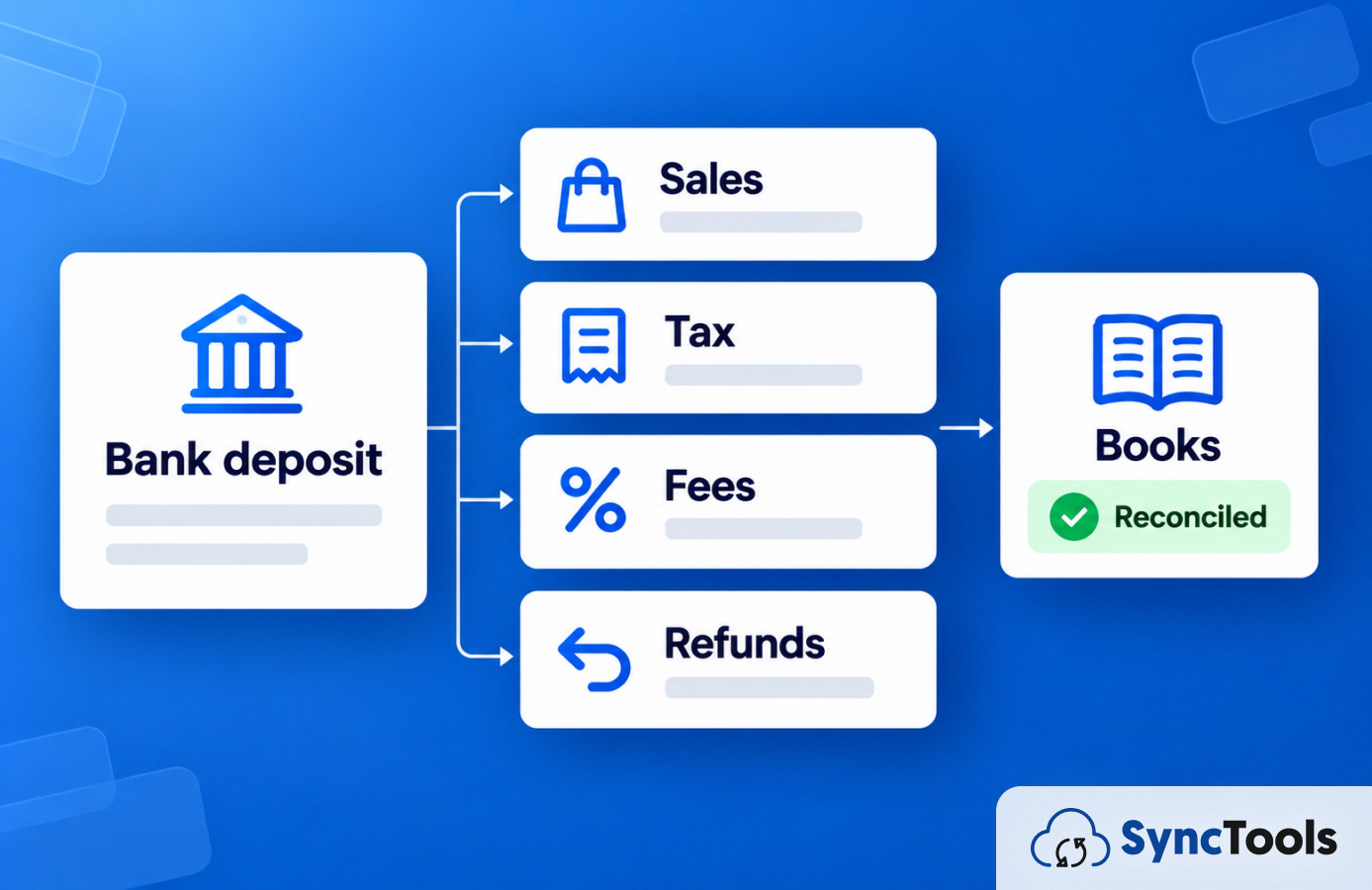
What looks like one bank deposit could actually represent dozens or hundreds of underlying transactions.
That is one reason online business bookkeeping needs to go beyond recording deposits and expenses.
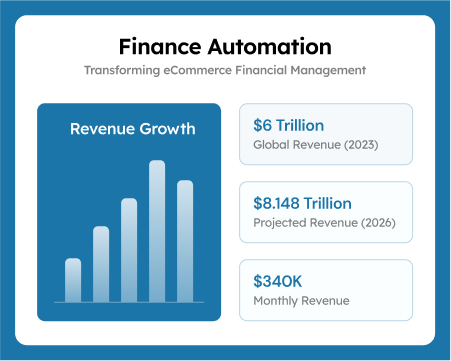
The market's scale makes this increasingly important. According to the U.S. Census Bureau, seasonally adjusted U.S. retail eCommerce sales reached an estimated $340.2 billion in Q2 2026, accounting for 17.1% of total retail sales.
As more commerce happens online, even relatively small businesses can generate large volumes of financial data across storefronts, marketplaces, payment gateways, banks, inventory systems, and accounting platforms.
This guide explains how to build an eCommerce bookkeeping process that keeps those moving parts connected, what records matter, where errors typically begin, and when automation may become useful.
Small Business Bookkeeping: What Does It Actually Mean for an eCommerce Business?
Small business bookkeeping is the process of recording, organizing, categorizing, and reconciling the financial transactions a business generates.
For a traditional small company, that may primarily involve invoices, expenses, bank transactions, payroll, and supplier bills.
For an eCommerce business, the transaction chain can be considerably longer.
A typical order may create financial activity across:
Customer Order → Sales Channel → Payment Processor → Fees & Adjustments → Payout → Bank → Accounting System
And the original sale itself can contain:
- Product revenue
- Shipping revenue
- Discounts
- Sales tax
- Marketplace fees
- Payment processing fees
- Refunds
- Chargebacks
- COGS
- Inventory movements
This distinction matters.
QuickBooks, for example, explains that an eCommerce payout can contain sales, discounts, refunds, expenses, and other adjustments rather than representing a single sale.
So, if a business records only the amount arriving in its bank account, important accounting information may disappear inside that net deposit.
A simple example
Imagine your store records:
| Transaction | Amount |
|---|---|
| Gross product sales | $10,000 |
| Sales tax collected | $700 |
| Refunds | -$500 |
| Marketplace/payment fees | -$400 |
| Other adjustments | -$100 |
| Net payout | $9,700 |
The $9,700 bank deposit is not necessarily your sales revenue.
Your bookkeeping needs to preserve the components that created that deposit.
Otherwise, revenue, expenses, tax liabilities, refunds, and profitability can become difficult to interpret.
Business Bookkeeping: The Financial Records You Should Be Able to Explain
Good business bookkeeping isn't simply about having numbers in accounting software.
You should be able to explain where those numbers came from.
The IRS notes that businesses should maintain records that clearly show income and expenses, and that good records help businesses prepare financial statements, identify income sources, track deductible expenses, prepare tax returns, and support amounts reported on those returns.
For an eCommerce business, several records deserve particular attention.
1. Profit and Loss Statement
Your Profit and Loss statement, or P&L, shows revenue and expenses over a specific period.
For an online retailer, that may include:
- Product sales
- Shipping income
- Discounts
- Returns
- COGS
- Marketplace fees
- Payment processing fees
- Advertising
- Fulfillment costs
- Software expenses
- Payroll and contractor costs
The usefulness of your P&L depends heavily on how accurately you categorize transactions before they reach the report.
2. Balance Sheet
The balance sheet shows what the business owns, owes, and retains at a particular point in time.
For eCommerce businesses, important balance-sheet accounts can include:
- Cash
- Inventory
- Payment processor clearing balances
- Accounts receivable
- Accounts payable
- Sales tax payable
- Loans
- Owner or shareholder equity
A profitable P&L doesn't automatically mean the balance sheet is correct.
3. Cash Flow Records
Profit and cash are different.
You could make a sale today but receive the marketplace payout days later. You could purchase inventory months before those products generate revenue.
Cash flow records help you understand what is actually entering and leaving the business.
4. Marketplace and Payment Processor Reports
Do not treat these as secondary records.
Shopify, Amazon, eBay, Stripe, PayPal, and other platforms can contain financial information that never appears clearly on the bank statement.
That may include fees, refunds, adjustments, reserves, disputes, and tax information.
5. Inventory and COGS Records
For product businesses, inventory affects more than operations.
Inventory purchased is generally not the same thing as COGS recognized from products sold.
Your bookkeeping process therefore needs a reliable way to connect product movement with its accounting impact.
6. Tax Records
Depending on where you operate and sell, your records may need to distinguish between revenue and taxes collected from customers.
Tax requirements vary significantly by jurisdiction, so confirm the appropriate treatment with a qualified accounting or tax professional.
Bookkeeping for Small Business: Why eCommerce Needs a Different Approach
Bookkeeping for small businesses often starts with the basics.
A founder opens a business bank account, connects accounting software, categorizes expenses, and reconciles the account every month.
That may work while transaction volume is low.
But eCommerce introduces a problem: your bank is usually seeing the end of the transaction, not the beginning.
Consider this flow:
If your accounting starts only at the final bank deposit, the underlying financial activity can become difficult to reconstruct.
This is why eCommerce bookkeeping often needs to reconcile more than:
Books ↔ Bank
It may need to reconcile:
Orders ↔ Payouts ↔ Bank ↔ Accounting System
QuickBooks' current Shopify and Amazon workflows similarly import sales, refunds, fees, and payout information so you can review transactions against the payout and resulting bank deposit.
The Practical Question to Ask
For every payout, you should ideally be able to answer:
What transactions created this deposit?
If answering that question requires downloading multiple CSV files and manually rebuilding every payout, the bookkeeping process may be reaching the point where a more connected workflow is worth considering.
Bookkeeping Best Practices for Small eCommerce Businesses
No single bookkeeping setup fits every online seller. Your sales channels, transaction volume, jurisdictions, inventory structure, accounting method, and reporting requirements all matter.
However, these bookkeeping best practices can create a stronger foundation.
1. Separate Business and Personal Activity
Maintain separate business banking and payment accounts wherever appropriate.
Mixing personal and business transactions creates unnecessary categorization work and can make financial reporting harder to review.
2. Build the Chart of Accounts Around How Your Business Operates
Avoid creating an account for every possible transaction simply because the accounting system allows it.
Your chart of accounts should provide enough detail to answer important business questions without becoming unmanageable.
An eCommerce chart of accounts might distinguish:
Income
- Product sales
- Shipping income
- Other operating income
Contra-revenue / adjustments
- Discounts
- Returns and refunds
Expenses
- Payment processing fees
- Marketplace fees
- Fulfillment expenses
- Advertising
- Software
Assets
- Bank
- Inventory
- Clearing accounts
Liabilities
- Sales tax payable
- Accounts payable
- Loans
The right structure depends on your accounting requirements and should be reviewed with your accountant where necessary.
3. Record Gross Activity, Not Just the Net Deposit
Suppose your marketplace reports:
Gross sales: $5,000
Refunds: $300
Fees: $200
Net payout: $4,500
Recording $4,500 simply as sales removes visibility into the $300 refund and $200 expense.
Your accounting workflow should preserve the relevant components while still letting the final payout reconcile to the bank deposit.
4. Reconcile Regularly
Do not leave every discrepancy for year-end.
A monthly close is much easier when you've already investigated the previous month's payout, bank, inventory, and transaction issues.
Depending on transaction volume, some businesses may benefit from reviewing syncs, exceptions, or payout activity more frequently.
5. Keep Supporting Records
Retain invoices, receipts, payout reports, supplier bills, sales reports, tax filings, and other supporting documents according to the rules applicable to your business.
For U.S. federal tax purposes, the IRS states that record-retention periods depend on what the document relates to. In many common situations, keep records supporting income, deductions, or credits until the applicable limitation period expires. Employment tax records generally need to be retained for at least four years.
Businesses operating elsewhere should follow their local requirements.
Simplify Your eCommerce Bookkeeping
Keep sales, refunds, fees, and payouts organized with reliable accounting integrations built for your eCommerce business.
What Should You Actually Record From an eCommerce Sale?
This is where bookkeeping becomes practical.
Consider an order with:
Product: $100
Discount: $10
Shipping: $5
Tax: $7
Customer payment: $102
Later, the payment processor deducts a $3 processing fee.
The business receives $99.
Recording only:
Bank deposit = $99 revenue.
Does not explain what happened.
Depending on your accounting setup, the transaction may need to preserve information relating to:
- Gross product revenue
- Discount
- Shipping income
- Tax collected
- Payment processing expense
- Net settlement
- Product COGS
- Inventory reduction
If the customer later returns the product, you may need additional entries.
That is why accurate eCommerce bookkeeping starts with transaction structure, not merely the bank feed.
Why Your eCommerce Sales Rarely Equal Your Bank Deposits
This is one of the most common sources of confusion for bookkeeping for small business owners.
Your sales dashboard might show:
$50,000 sales
while the bank receives:
$43,850
That does not automatically mean $6,150 is missing.
The difference might include:
- Refunds
- Discounts
- Marketplace commissions
- Payment processing fees
- Fulfillment fees
- Advertising deductions
- Chargebacks
- Reserves
- Tax
- Currency adjustments
- Other platform adjustments
What should you do when the payout doesn't match?
Do not immediately adjust the accounting entry simply to make reconciliation reach zero.
Instead, work backward.
Step 1: Find the exact bank deposit
Example:
Deposit: $43,850
Step 2: Find the corresponding platform payout
Check the settlement or payout report.
Step 3: Review the components
For example:
| Component | Amount |
|---|---|
| Gross sales | $50,000 |
| Refunds | -$2,500 |
| Platform fees | -$1,500 |
| Processing fees | -$650 |
| Other adjustments | -$1,500 |
| Net payout | $43,850 |
Step 4: Compare those components with your books
If the payout report equals $43,850 and the bank equals $43,850, but the accounting system does not, investigate the transaction mapping rather than changing the bank figure.
This approach turns reconciliation from guesswork into a traceable process.
Trace Every Payout Back to Its Source Transactions
SyncTools records the sales, refunds, fees, and taxes behind each Shopify, Amazon, WooCommerce, or eBay payout in QuickBooks or Xero, so every bank deposit reconciles without rebuilding it from CSV files.
Cash vs. Accrual Accounting for an eCommerce Business
Another key decision is when to recognize revenue and expenses.
Under the cash method, you generally record income when you receive it and expenses when you pay them.
Under the accrual method, you generally recognize income when earned and expenses when incurred, even if cash moves at another time.
For example:
You sell a product on December 29.
The marketplace pays you on January 3.
Under different accounting methods, recognition timing can differ.
Inventory can introduce additional considerations. IRS guidance notes that businesses that produce, purchase, or sell merchandise may be subject to inventory and accounting-method requirements, although exceptions exist for qualifying small businesses.
There is therefore no responsible universal answer to:
"Every eCommerce business should use cash accounting."
or:
"Every eCommerce business must use accrual accounting."
Your business structure, inventory, jurisdiction, tax requirements, and reporting needs should determine the approach, ideally with professional accounting guidance.
How to Set Up Bookkeeping for Your eCommerce Business
If you are building your bookkeeping process from scratch, use this sequence.
Step 1: Identify Every Source of Financial Data
Create a simple list:
Sales channels
- Shopify
- Amazon
- WooCommerce
- eBay
- Etsy
- Other marketplaces
Payment providers
- Shopify Payments
- Stripe
- PayPal
- Marketplace payments
Banking
- Operating account
- Credit cards
- Foreign currency accounts
Accounting
- QuickBooks
- Xero
- Zoho Books
- NetSuite
- Sage
- Business Central
- Other systems
This creates your financial data map.
Step 2: Establish Your Chart of Accounts
Determine where sales, refunds, fees, COGS, inventory, tax, shipping, and other transactions belong.
Do this before importing thousands of transactions.
Cleaning up poor mappings later can require significantly more work.
Step 3: Decide the Level of Accounting Detail
Do you need to record every order individually?
Or could summarized accounting provide the information you need?
The answer may depend on:
- Transaction volume
- B2B vs. B2C sales
- Audit trail requirements
- Customer-level reporting
- Accounting software capacity
- Reconciliation requirements
There is no universal winner.
A high-volume consumer seller may benefit from summarized entries, while another business may require order-level records.
Step 4: Establish Product and COGS Mapping
Products should be connected to the appropriate accounting treatment.
This becomes particularly important when different product groups have different:
- Revenue accounts
- COGS accounts
- Tax treatment
- Classes
- Categories
Step 5: Establish Refund Rules
A refund is not simply money leaving the bank.
Depending on the situation, it may affect:
Revenue → Tax → Inventory → COGS → Fees → Payout
Returns can become particularly complicated when the refund and physical return happen at different times.
Step 6: Build the Payout Reconciliation Process
Every settlement should ultimately explain the corresponding bank movement.
Your target workflow is:
Step 7: Define Your Month-End Close
Before considering a month complete, review areas such as:
- Bank reconciliation
- Credit card reconciliation
- Marketplace clearing balances
- Outstanding payouts
- Refunds
- COGS
- Inventory
- Sales tax liabilities
- Accounts payable/receivable
- P&L
- Balance sheet
The exact checklist will vary by business.
Set Up Your eCommerce Bookkeeping Workflow the Right Way
Walk through your sales channels, chart of accounts, product and COGS mapping, refund rules, and payout reconciliation with our team, and see which repeatable steps SyncTools can automate.
Manual Bookkeeping vs. Accounting Automation
For an early-stage entrepreneur with a small number of monthly transactions, manual bookkeeping may be perfectly reasonable.
A spreadsheet plus accounting software may be enough.
The challenge appears as volume and complexity increase.
Imagine processing manually:
1 store × 100 orders
versus:
4 channels × thousands of orders × refunds × fees × payouts × currencies × tax jurisdictions
The underlying accounting principles have not necessarily changed.
The volume of financial data has.
That is where accounting automation can become useful.
Rather than asking:
"Can software replace my accountant?"
a more useful question is:
"Which repetitive data-processing tasks should software handle, and which decisions should remain under human review?"
Automation may help with repetitive tasks such as:
- Importing transactions
- Applying established mappings
- Separating fees
- Processing refunds
- Grouping transactions
- Recording payouts
- Matching transactions to settlements
- Flagging exceptions
Human involvement remains valuable for:
- Designing the chart of accounts
- Approving mappings
- Reviewing unusual transactions
- Assessing tax treatment
- Month-end review
- Correcting exceptions
- Financial interpretation
The strongest bookkeeping process does not necessarily remove people.
It gives them better-organized information to review.
Where AI Fits Into eCommerce Bookkeeping
AI is increasingly being introduced into accounting workflows, but there is an important distinction between AI making a suggestion and AI having unrestricted authority over the books.
For account mapping, for example, an AI-supported workflow might look like:
This creates a more controlled model:
AI suggests. Humans approve.
The objective is not to remove accounting judgment.
It reduces repetitive work while keeping important accounting decisions reviewable.
What Happens When You Have Months of Historical Transactions?
A common bookkeeping problem isn't today's transactions.
It is everything that happened before today.
Perhaps the business:
- Started with spreadsheets
- Changed bookkeepers
- Added a new accounting platform
- Opened additional marketplaces
- Fell behind on reconciliation
- Changed its chart of accounts
- Previously recorded only net deposits.
In those cases, connecting future transactions alone won't close the historical gap.
You may need to determine:
- What historical period needs to be corrected?
- Which channels generated transactions during that period?
- Are original payout reports still available?
- Were transactions already entered into the accounting system?
- Would importing them create duplicates?
- What mappings should apply historically?
- Which periods have already been closed or filed?
Historical bookkeeping should therefore be approached carefully rather than treated as a simple bulk import.
Behind on Reconciliation? Bring Historical Transactions Into Your Books
SyncTools supports historical transaction syncing and white-glove onboarding, so past sales, refunds, fees, and payouts can be mapped carefully without duplicating entries or disturbing closed periods.
When Should a Small Business Consider a Bookkeeper?
Doing your own bookkeeping can work when your financial activity remains manageable.
But there is usually a point where the owner's time is better spent elsewhere.
Signs that you may need bookkeeping help include:
- Reconciliations repeatedly falling behind.
- Payouts no longer matching easily.
- Multiple marketplaces or payment processors
- Inventory becoming difficult to reconcile
- Frequent bookkeeping corrections
- Expansion into new jurisdictions
- Difficulty understanding your P&L or balance sheet
- Month-end taking too long.
- Tax preparation requiring extensive clean-up
A small business bookkeeper may manage transaction records and routine reconciliations. At the same time, accountants and tax professionals can provide additional guidance where reporting, tax, compliance, or accounting-method decisions require professional judgment.
The right combination depends on the business.
Common eCommerce Bookkeeping Mistakes and How to Fix Them
Mistake 1: Recording net payouts as sales
Problem: Revenue and expenses become mixed.
Better approach: Break the payout into the financial components that produced the deposit.
Mistake 2: Treating collected sales tax as revenue
Problem: Revenue may be overstated where collected tax represents an amount owed or remitted to a tax authority.
Better approach: Configure the appropriate liability and tax treatment for your jurisdiction with professional guidance.
Mistake 3: Ignoring marketplace fees
Problem: Gross margin and channel profitability become harder to understand.
Better approach: Capture relevant marketplace and payment processing fees separately.
Mistake 4: Recording inventory purchases directly as COGS without considering inventory accounting
Problem: Expense timing may no longer align with product sales.
Better approach: Establish an inventory and COGS process appropriate to your accounting method and requirements.
Mistake 5: Waiting until year-end to reconcile
Problem: Twelve months of small differences become one large investigation.
Better approach: Establish a recurring reconciliation and month-end review process.
Mistake 6: Connecting multiple tools without checking for duplicate posting
Problem: The same transaction can potentially enter the books through more than one workflow.
Better approach: Decide which system owns each data flow before enabling automation.
Mistake 7: Automating incorrect mappings
Automation does not automatically mean accuracy.
If your original rule says:
Marketplace fee → Sales revenue
then automation can repeatedly apply the wrong treatment.
Better approach:
Configure → Test → Review → Approve → Scale
rather than:
Connect → Automate Everything → Investigate Later.
A Practical Monthly eCommerce Bookkeeping Checklist
At the end of each accounting period, ask:
Sales
- Are gross sales recorded?
- Are discounts separated appropriately?
- Are shipping revenues accounted for?
- Are all active sales channels included?
Refunds
- Are full and partial refunds recorded?
- Are returns affecting inventory appropriately?
- Have tax adjustments been considered?
Fees
- Are payment processing fees captured?
- Are marketplace fees captured?
- Are fulfillment and other platform deductions accounted for?
Payouts
- Does each payout reconcile?
- Do payouts correspond with bank deposits?
- Are there outstanding settlements?
Inventory & COGS
- Does recorded inventory broadly agree with operational inventory records?
- Is COGS being recognized consistently?
- Have returns, damaged stock, or adjustments been reviewed?
Tax
- Is collected tax separated from revenue where applicable?
- Have applicable tax liabilities been reviewed?
- Are supporting tax reports retained?
Financial Statements
- Has the P&L been reviewed?
- Has the balance sheet been reviewed?
- Are unusual movements investigated rather than simply adjusted away?
If several answers are consistently "no," the problem may not be the bookkeeping team.
It may be the bookkeeping workflow.
How SyncTools Can Support an eCommerce Bookkeeping Workflow
As an eCommerce business grows, the challenge is often less about understanding what bookkeeping is and more about moving large amounts of marketplace data into the accounting system in a usable format.
SyncTools sits between eCommerce platforms and accounting systems, helping organize financial data such as sales, refunds, fees, taxes, COGS, products, and payouts before it reaches the books. Current SyncTools materials describe connections between eCommerce channels such as Shopify, Amazon, WooCommerce, and eBay and accounting platforms including QuickBooks, Xero, Zoho Books, Sage, NetSuite, and Microsoft Dynamics 365.
A typical workflow can look like:
The goal is not simply to "sync data."
It is to preserve the accounting context behind the transaction.
AI-assisted mapping with human control
SyncTools can use AI-assisted account mapping to support the mapping process. The intended approach is controlled rather than completely hands-off:
AI suggests → Human reviews → Human approves → Mapping is applied.
This can help businesses reduce repetitive mapping work while retaining human oversight over how financial data is categorized.
Historical data
Businesses moving from manual bookkeeping or changing their accounting workflow may also need to bring historical transactions into the accounting system.
SyncTools supports historical transaction syncing, which matters when a business needs to work with prior eCommerce data rather than starting only from the connection date.
Review the appropriate historical period and import approach carefully to avoid duplicates or changes to already finalized periods.
White-glove onboarding
For businesses that do not want to configure mappings entirely on their own, SyncTools also supports white-glove onboarding.
This can be particularly useful where the initial setup involves multiple channels, product mappings, accounting accounts, payout structures, or historical data.
The objective is to establish the accounting workflow first, validate it, and then allow automation to handle repeatable activity.
Your Bookkeeping System Should Answer Questions, Not Just Store Transactions
Good bookkeeping isn't measured by how many transactions exist in QuickBooks, Xero, or another accounting system.
It is measured by whether those transactions help you understand the business.
At any reasonable point, you should be able to investigate questions such as:
- How much did we actually sell?
- How much did refunds reduce revenue?
- What did marketplaces and payment processors charge us?
- What are our COGS?
- How much inventory do we hold?
- What tax liabilities have we recorded?
- Why was this bank deposit different from our sales total?
- Which payouts are still outstanding?
- Can we trace this accounting entry back to its source?
If your books cannot help answer those questions, adding more transactions is unlikely to solve the problem.
The bookkeeping process itself may need attention.
Final Thoughts: Get the Flow Right Before You Automate It
eCommerce bookkeeping does not become difficult because accounting suddenly follows different principles online.
It becomes difficult because the financial data is fragmented.
An order begins in one system.
Payment happens in another.
Fees are deducted somewhere else.
The payout reaches the bank later.
Inventory changes separately.
And eventually all of that information needs to make sense inside your accounting system.
The practical objective is therefore to build a traceable path:
Order → Financial Components → Payout → Accounting → Bank
Start by understanding that flow.
Then establish your accounts and mappings.
Reconcile the numbers.
Test the process.
Only then decide which repetitive parts to automate.
For businesses processing increasing eCommerce transaction volumes, SyncTools provides a connection layer between commerce platforms and accounting systems, supporting product mapping, sales, refunds, fees, tax mapping, COGS, payouts, historical data, and AI-assisted account mapping with human review.
Want to see how your current eCommerce-to-accounting workflow could be structured?
Explore SyncTools or speak with the team about your current sales channels, accounting platform, transaction volume, and reconciliation process.
Frequently Asked Questions
What is eCommerce bookkeeping?
eCommerce bookkeeping is the process of recording and organizing the financial transactions generated by an online business. In addition to normal income and expenses, it may involve marketplace sales, payment processing fees, refunds, tax, inventory, COGS, chargebacks, and payouts.
How do I do bookkeeping for a small eCommerce business?
Start by identifying every sales channel, payment provider, bank account, and accounting platform the business uses. Establish a suitable chart of accounts, record the relevant components of sales rather than only net deposits, reconcile marketplace payouts with bank deposits, track inventory and COGS where applicable, and review the financial statements regularly.
Can I do my own eCommerce bookkeeping?
Yes, some business owners can manage their own bookkeeping, particularly when transaction volumes and sales channels are limited. As the business adds channels, inventory complexity, tax jurisdictions, currencies, or higher transaction volumes, professional bookkeeping support or accounting automation may become more practical.
What is the difference between bookkeeping and accounting?
Bookkeeping primarily focuses on recording, categorizing, organizing, and reconciling financial transactions. Accounting generally goes further into interpreting those records, preparing and analyzing financial statements, applying accounting principles, and supporting financial and tax decisions.
Should I record Shopify or Amazon payouts as revenue?
A payout should not automatically be treated as revenue. Platforms may deduct refunds, fees, adjustments, and other amounts before sending the final deposit. For example, current QuickBooks documentation describes Shopify and Amazon payouts as containing multiple underlying sales and adjustments.
Why don't my eCommerce sales match my bank deposits?
The sales figure generally represents customer activity, while a bank deposit may represent the net amount remaining after refunds, discounts, processing fees, marketplace fees, adjustments, or other deductions. Reviewing the payout or settlement report can help explain the difference.
How often should a small business update its bookkeeping?
The appropriate frequency depends on transaction volume and complexity. Businesses with significant eCommerce activity may benefit from monitoring transactions and exceptions throughout the month rather than waiting until month-end. Also review bank, payout, inventory, and balance-sheet accounts as part of a consistent close process.
What records should a small eCommerce business keep?
Relevant records can include sales reports, invoices, receipts, supplier bills, marketplace settlement reports, bank and credit-card statements, inventory records, payroll records, tax documentation, refund records, and financial statements. Retention requirements depend on jurisdiction and document type.
Should an eCommerce business use cash or accrual accounting?
It depends on the business structure, jurisdiction, inventory, tax rules, and reporting requirements. Cash accounting generally recognizes transactions when cash moves, while accrual accounting generally recognizes income when earned and expenses when incurred. Businesses should confirm the appropriate method with a qualified accountant or tax professional.
When should I automate eCommerce bookkeeping?
Automation may become worth evaluating when transaction volumes make manual entry difficult, multiple sales channels create repetitive reconciliation work, marketplace fees and refunds require frequent categorization, or finance teams spend substantial time manually rebuilding payout information.
Can AI handle bookkeeping automatically?
AI can support tasks such as transaction classification, account-mapping suggestions, anomaly identification, and repetitive processing. Important accounting decisions should still have appropriate controls and review. A model where AI suggests and a human approves can combine automation with accounting oversight.
Can historical eCommerce transactions be synced into accounting software?
Depending on the platforms and integration being used, historical syncing may be possible. Before importing historical activity, businesses should check for existing transactions, duplicate-entry risks, closed accounting periods, and previously filed tax periods.
What is the biggest bookkeeping mistake an eCommerce business can make?
No single mistake applies to every business, but recording net marketplace deposits as revenue without understanding the underlying sales, fees, refunds, taxes, and adjustments can significantly reduce financial visibility. A better process preserves those components and reconciles them back to the payout and bank deposit.
Ready to automate your accounting?
Connect Shopify, WooCommerce, or Linnworks to QuickBooks, Xero & more. Setup in minutes.