
AI Account Mapping
How SyncTools uses AI to automatically suggest and apply QuickBooks account mappings for your eBay transactions - saving setup time and reducing manual errors.
What Is SyncTools AI Account Mapping?
AI Account Mapping helps you configure your eBay to QuickBooks Online integration in just a few clicks. Instead of manually selecting a QuickBooks account for every eBay transaction category, SyncTools uses Artificial Intelligence (AI) to analyze your QuickBooks Chart of Accounts and automatically recommend the most appropriate account for each category.
The AI considers account names, account types, accounting purpose, and country-specific accounting practices to generate intelligent recommendations. Every suggestion includes a confidence score, allowing you to review and approve the mappings before saving them.
Before You Begin
Before using AI Account Mapping, ensure that:
- Your eBay account is connected.
- Your QuickBooks Online company is connected.
- The QuickBooks Chart of Accounts has been successfully imported into SyncTools.
- You have selected the correct country for your business.
How to Open AI Account Mapping
- Log in to SyncTools.
- Open your eBay → QuickBooks Online integration.
- Navigate to Settings.
- Select Account Mapping.
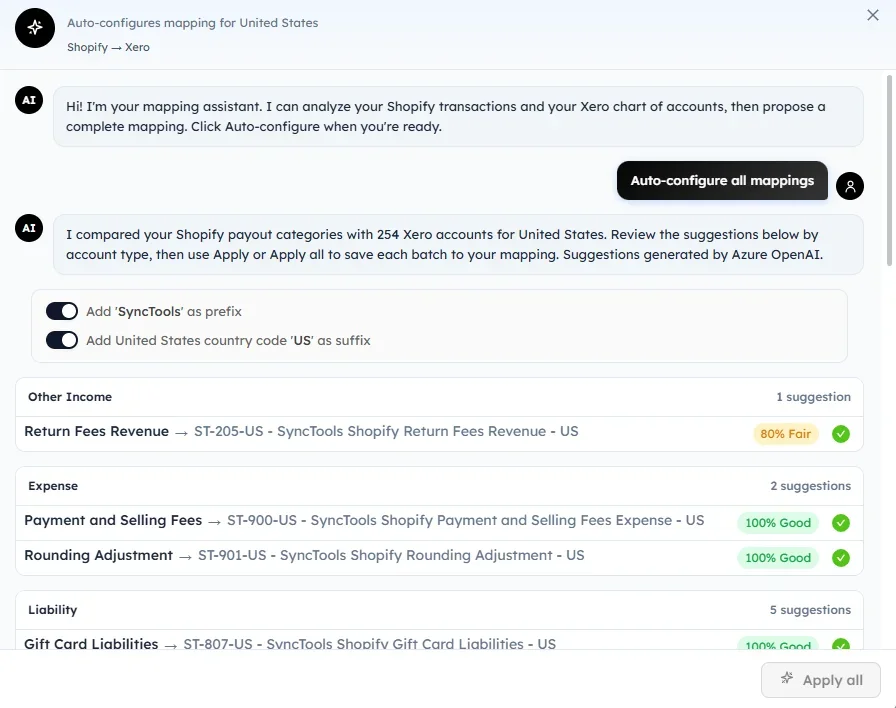
- Click Auto-configure All Mappings.
SyncTools will begin analyzing your QuickBooks Chart of Accounts and generate AI-powered mapping recommendations.
How AI Generates Account Mapping Recommendations
When you click Auto-configure All Mappings, SyncTools performs the following actions automatically:
- Retrieves all supported eBay transaction categories.
- Downloads the latest Chart of Accounts from QuickBooks Online.
- Compares each eBay category with available QuickBooks accounts.
- Evaluates account names, account types, and accounting purpose.
- Calculates the best matching account for each category.
- Assigns a confidence score to every recommendation.
- Displays the results grouped by account type.
This process usually takes only a few seconds.
How to Review AI Account Mapping Suggestions
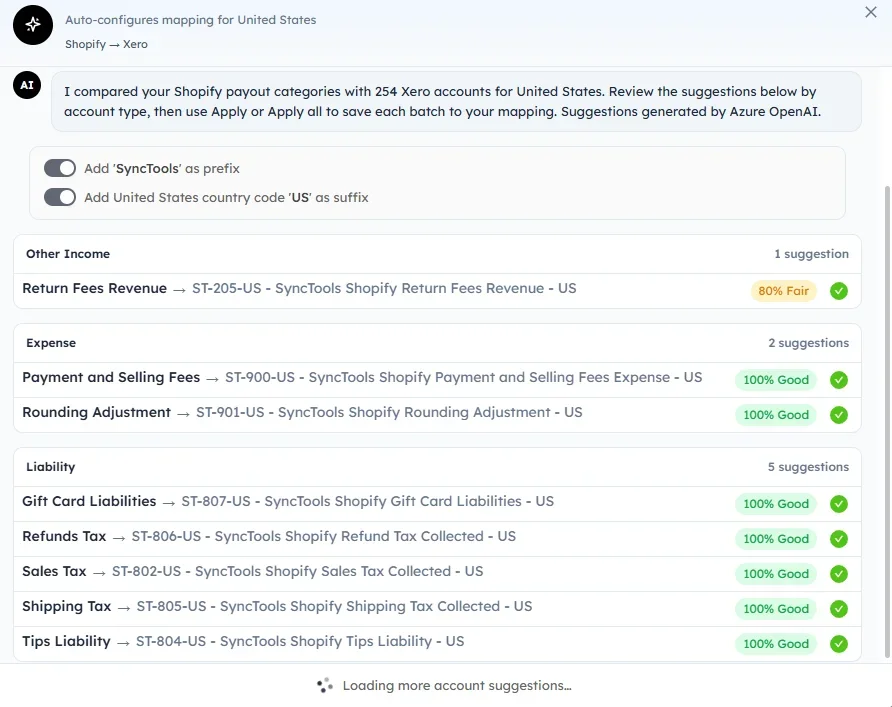
Once the analysis is complete, the recommendations are displayed by account type, making them easier to review.
Examples include:
- Income
- Expense
- Liability
- Asset
- Cost of Goods Sold
- Other Income
Each mapping displays:
- eBay transaction category
- Recommended QuickBooks account
- Confidence score
- Mapping status
Review each suggestion carefully before applying it.
Understanding AI Mapping Confidence Scores
Every AI recommendation includes a confidence indicator that reflects how closely the suggested QuickBooks account matches the eBay transaction category.
| Confidence | Meaning |
|---|---|
| 95–100% | Excellent match. The AI is highly confident that the suggested account is appropriate. |
| 80–94% | Good match. The recommendation is suitable but should be reviewed before applying. |
| Below 80% | Low confidence. The mapping should be reviewed and confirmed manually. |
The confidence score is intended to assist with decision-making and does not prevent you from selecting a different account.
How to Apply AI Account Mapping Recommendations
You can choose to:
- Apply a single mapping.
- Modify a suggested account before saving.
- Apply all recommendations at once.
To save all AI-generated mappings:
- Review the suggested mappings.
- Click Apply All.
- Wait for the confirmation message.
Once applied, the mappings become part of your active integration configuration.
Was this article helpful?