
AI Threshold Advisor
How SyncTools AI Threshold Advisor helps eBay sellers set the right transaction grouping thresholds for QuickBooks - balancing detail level with accounting performance.
What Is SyncTools AI Threshold Advisor?
AI Threshold Advisor helps eBay sellers monitor their tax registration thresholds across the countries in which they sell. Instead of manually researching tax regulations or tracking sales against registration limits, SyncTools continuously analyzes your sales activity and compares it with the latest tax threshold requirements for your selected countries.
The advisor provides AI-powered recommendations, displays the applicable threshold limit, explains why the threshold applies, and includes the official government source used to determine the recommendation. This helps businesses prepare for tax registration at the right time and reduces the risk of non-compliance.
Before You Begin
Before using AI Threshold Advisor, ensure that:
- Your eBay account is connected.
- Your QuickBooks Online company is connected.
- You have selected the countries where your business operates.
- Your synchronization settings have been completed.
How to Open AI Threshold Advisor in SyncTools
- Log in to SyncTools.
- Open your eBay → QuickBooks Online integration.
- Navigate to Settings.
- Select AI Threshold Advisor.
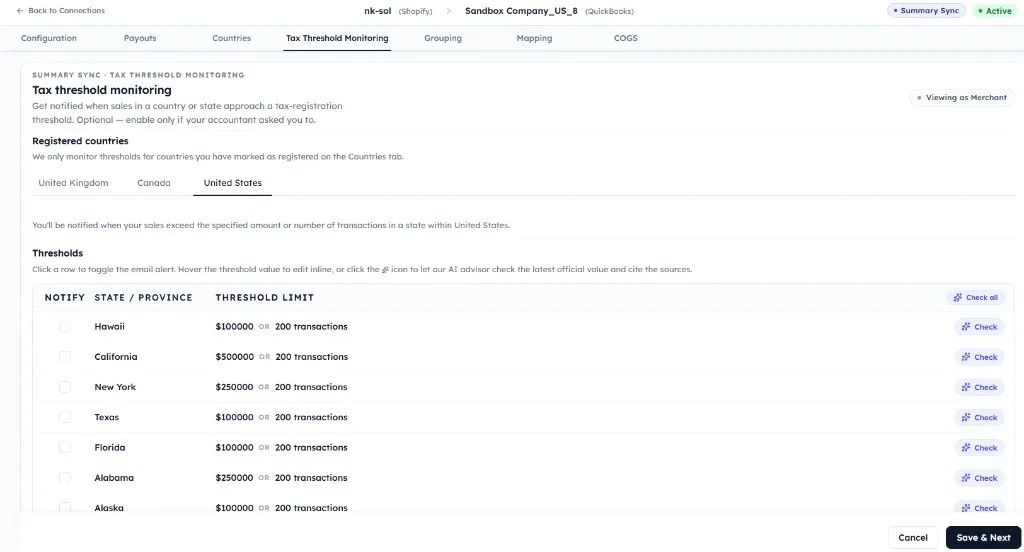
- Choose the country you want to review.
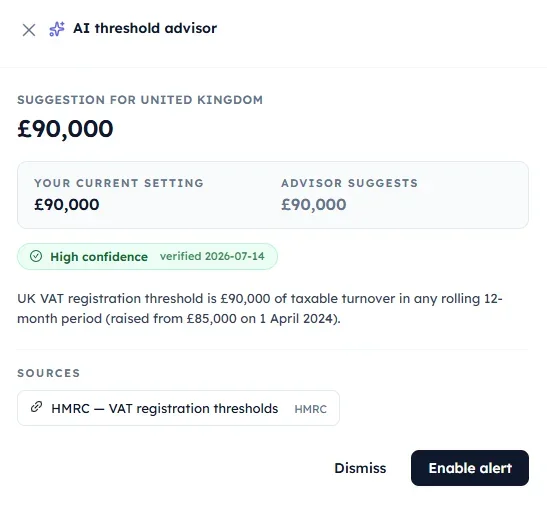
The advisor automatically loads the latest threshold information for the selected country.
How AI Threshold Advisor Works
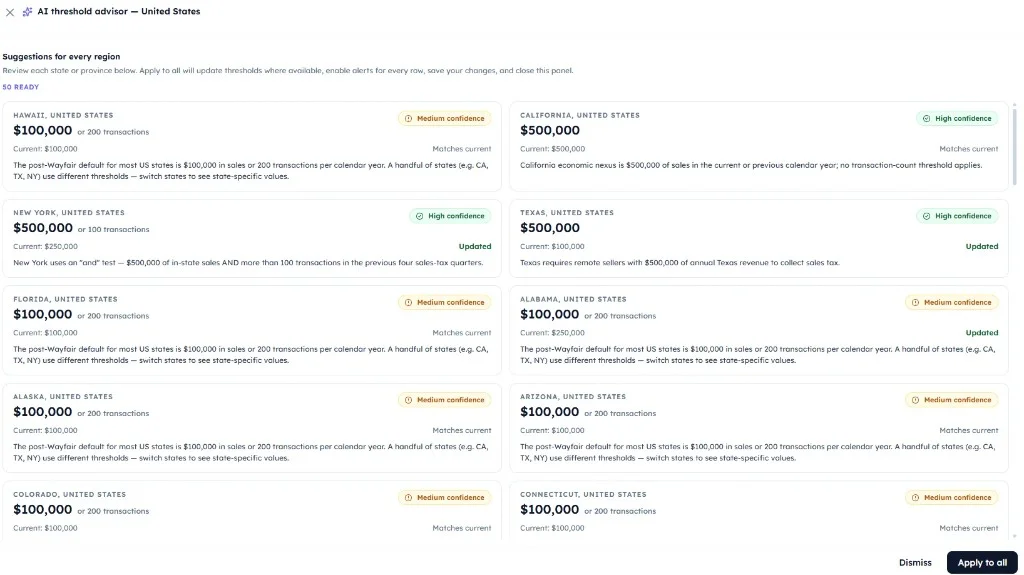
When a country is selected, SyncTools automatically performs the following actions:
- Identifies the selected country.
- Retrieves the applicable tax registration threshold for that country.
- Reviews your eBay sales activity for that region.
- Compares your sales against the country's threshold.
- Calculates your progress toward the threshold.
- Displays an AI recommendation with a confidence score.
- Provides links to the official government or tax authority source.
This allows merchants to understand when they may need to register for tax without manually researching country-specific regulations.
Understanding Tax Registration Threshold Information
For each selected country, AI Threshold Advisor displays:
- Country name
- Applicable tax type (for example, Sales Tax, VAT, or GST)
- Registration threshold
- Current sales value
- Remaining amount before reaching the threshold
- AI recommendation
- Confidence level
- Official government source
- Date the threshold information was last updated
This information is presented in a simple, easy-to-understand format so merchants can quickly assess their compliance status.
Understanding AI Threshold Recommendations
Based on your sales activity, the advisor generates one of the following recommendations:
Below Threshold
Your sales are currently below the registration threshold. No immediate action is required, but SyncTools will continue monitoring your sales.
Approaching Threshold
Your sales are nearing the registration threshold. The advisor recommends preparing the required tax registration documents and reviewing local tax obligations.
Threshold Reached
Your sales have reached or exceeded the country's registration threshold. The advisor recommends reviewing your tax obligations and registering with the appropriate tax authority as required by local regulations.
Confidence Score
Each recommendation includes a confidence indicator that reflects how accurately the AI has matched your sales data with the applicable tax rules.
| Confidence | Meaning |
|---|---|
| 95–100% | High confidence. Threshold information and recommendation are strongly supported. |
| 80–94% | Good confidence. Review the recommendation and official source. |
| Below 80% | Additional review recommended before making compliance decisions. |
The confidence score is provided as guidance and should be considered alongside the referenced government documentation.
Was this article helpful?